 KitCut
We tested four AI talking-head models, then drew people instead
People asked for films with real people in them: the founders introducing their product, a speaker inviting you to their talk. The obvious way is a talking-head model that makes a photo speak. We benchmarked four of them, watched the results, and dropped the whole approach. KitCut draws people instead, from one photo, in thirteen styles, and each one talks in its own voice.
The obvious approach
A neural talking-head model takes one photo and one audio clip and moves the face, the mouth most of all, to match. Several are open source and run on a modest graphics card. We tried the four best known on a laptop with a 4 GB card, each with one photo and one 4-second line:
| Model | Time for one 4 s line | Graphics memory | The mouth | The catch |
|---|---|---|---|---|
| Ditto | 51–61 s | 2.0 GB | The best: clear shapes and teeth, the background intact. Hangs open in the pauses. | Finds the face with a detector licensed for non-commercial use only |
| JoyVASA | ~65 s | 2.1 GB | Weak: lips roll in, eyes look startled | The same non-commercial face detector |
| MuseTalk 1.5 | ~124 s | 3.9 GB | Best-timed closing of the lips, but it erased a man's beard | Its face parser was trained on non-commercial data |
| SadTalker | ~103 s | 2.7 GB | A blurry face in a blurred box | Uses a non-commercial face model |
Hosted services exist too, at roughly 3 to 12 cents per second of face. A one-minute film with a face on screen is a few dollars on top of everything else.
Two lessons came from the table before anyone looked at a clip. The licences: every one of the four leans on a part that may not be used commercially, and it's buried a layer down, not in the headline licence. The speed: the best one needed about 10 minutes of graphics card time for a minute of film with one face.
Then we watched them
The verdict took one look: "Those photorealistic ones look cringe. I don't want them."
That's not about any one model. A real face that moves almost right is worse than a face that doesn't pretend. The eye goes straight to the mouth that hangs open in a pause, the beard that vanishes, the blur round the jaw. And a realistic face saying words it never said is a deepfake, whatever the intent. The decision was short: "We skip all deep fake models." We deleted the test clips from our test channel.
Draw them instead
The founder's idea was to start from the photo and draw the person, then animate the drawing: a newspaper photo, a felt puppet, a caricature, something that's clearly made rather than recorded.
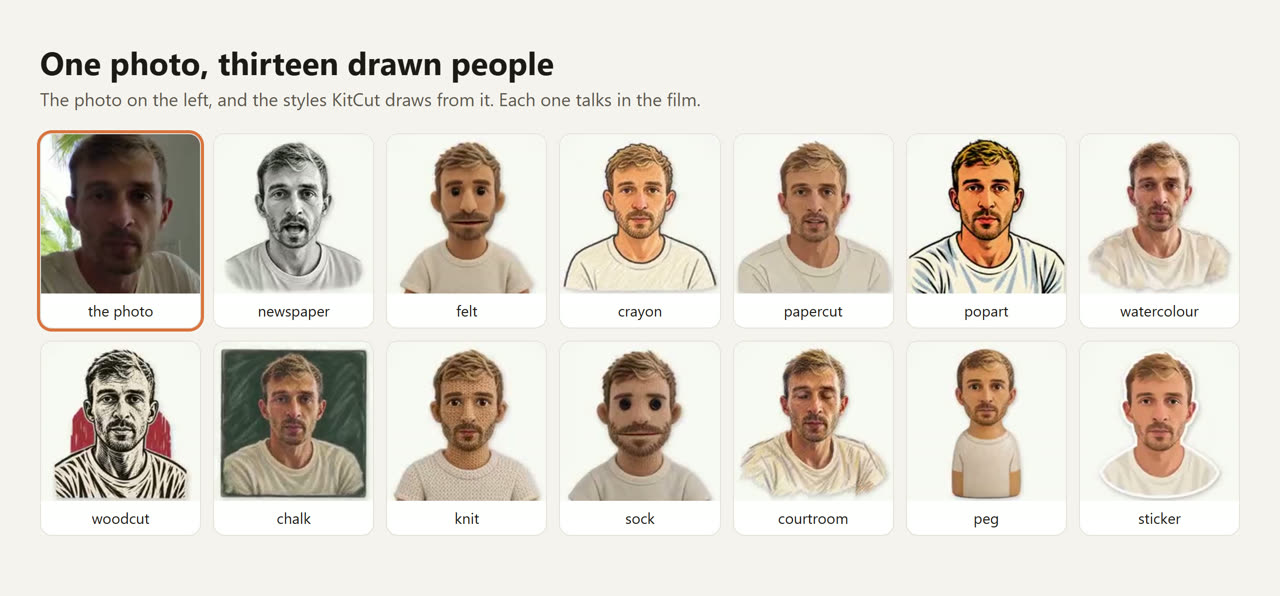
How it works, briefly:
- The photo is redrawn in the chosen style, keeping the person's face recognisable.
- The drawing is measured once: where the eyes, mouth and outline of the head are. This runs on an ordinary processor, not a graphics card.
- Claude gives the person lines in the film, and the mouth moves with that person's own audio, line by line.
Drawing a person costs about 11 cents. A film can have up to four people, each in their own voice.
A small detail that mattered: a drawn mouth that moves exactly with the sound looks late. Real mouths move a little before the sound they make, by 80 to 140 milliseconds. Ours leads by 80, and the timing reads as natural.
Not a hidden feature
The second decision was about the interface. Our habit was to let Claude notice a photo in the attachments and work out that it's a person to bring to life. The founder's rule: "Users need to see capabilities and guidance. Otherwise no one will ever use it."
So when you make a film, there's a People row in the idea box. You add up to four photos, name each person, pick one of the thirteen styles or let Claude choose, and tick that you have their permission. It shipped on September 30, open to everyone, the day after the idea came up.
The rules we keep
- Drawn, never photoreal. No lip-synced photographs, no generated video of a real face.
- Permission is part of the request. You confirm you have the right to use each person's photo before the film is made.
- No invented words for public figures. We don't publish films where a real, living public figure says lines they never said.
- Two styles stay in the lab. A toy-brick and a block-game look were great fun, and too close to other companies' trademarks to offer.
If you're adding people to AI video
- Watch the output before reading the benchmark. The models were fine on paper and wrong on screen.
- Read the licence two layers down. The face detector or the face model is where "non-commercial" hides.
- A clear style is honest. People can tell a drawing from a recording, and nobody is fooled.
- Put the feature where people can see it. A capability nobody finds is one nobody uses.
Everything about putting people in a film (the styles, what makes a good photo, permission, and what it can't do) is on People in a film. We wrote about the same principle, letting the person asking set the style, in Delete the style from your system prompt, and about why a template is shown as an example rather than a form in AI video templates should be examples, not forms.