 KitCut
How to run MiniMax H3 locally on an 8 GB GPU: settings, speed and prompt rules from a real episode
Yes, MiniMax H3 runs on an 8 GB graphics card. We ran it on one RTX 3070 (8 GB) with 32 GB of system RAM, through Wan2GP, using the FastH3 Omni model (int8, 8 steps) with a Q4 text encoder at 1344x768. It costs about 1.2 to 1.4 GPU-minutes per second of finished video: a 4-second shot takes 4 to 6 minutes, a 9-second shot 11 to 13. With it we re-shot the first minute of an episode of Leo, KitCut's own children's series, as 11 generated shots. Here are the exact settings, the prompt format H3 follows, the 17 rules we learned (each with the defect that taught it) and what still fails.
Updated 25 October 2026
At a glance
- It runs on 8 GB. One RTX 3070 with 32 GB of RAM, each job capped at 22 GB of RAM. MiniMax's own example spreads the model across four GPUs; Wan2GP streams it through system memory instead.
- Speed. 96 GPU-minutes for the 71.6 seconds of our final minute. A 5-minute episode is about 6 to 7 hours of machine time, plus a fix pass.
- Don't drop to 480p. At 480p our boy turned into another boy halfway through a 5-second clip; at 1344x768 he held.
- Write MiniMax's six-section prompt in full. It took stray legs from 5 shots in 11 to none, the car's interior from three colours to one and garbled signs from two to none.
- Pictures did the most. Each character and each set drawn alone by the series' own code. The empty car interior alone turned a generic car into the series.
- Consistent, not random. Three seeds of one shot gave three usable, nearly identical takes. When a shot is wrong, fix the prompt rather than re-rolling the seed.
- Still fails: words alone could not make the stranger's car a two-door, outdoor shots came out glossier than indoor ones, and a close-up of bare soles came out with miscounted toes.
How to run MiniMax H3 locally, step by step
This is what we did, in order. We set everything in Wan2GP's settings files (shown below); the names here are the ones its interface uses. The sections below explain each step.
- Install Wan2GP from its GitHub repository. These are the commands its README gives for RTX 20xx to 50xx cards (on Windows it also asks for Triton). We ran the same versions with uv instead of conda.
Then start it withgit clone https://github.com/deepbeepmeep/Wan2GP.git cd Wan2GP conda create -n wan2gp python=3.11.14 conda activate wan2gp pip install torch==2.10.0 torchvision==0.25.0 torchaudio==2.10.0 --index-url https://download.pytorch.org/whl/cu130 pip install -r requirements.txtpython wgp.py. - Choose the model "MiniMax H3 FastH3 Omni 8-Step 20B".
- Set "Text Encoder" to "Qwen3-VL GGUF Q4_K_M". Leave "DiT Denoising Priority" at its default, "Lower VRAM": every one of our shots ran with it.
- Set the resolution to 1344x768, with 8 steps.
- Write the six-section prompt (the format, and a real one in full). Set "How to Process each Line of the Text Prompt" to "All the Lines are Part of the Same Prompt", or Wan2GP splits it at the blank lines.
- Add the reference pictures: one clean picture for each character and each place, in the order the prompt numbers them (rules 9 to 12).
- Generate. The first time, Wan2GP downloads about 42 GB: the model (23.1 GB), the text encoder (14.6 GB) and three smaller files (4.1 GB: the video and audio VAEs and a latent upscaler).
What is MiniMax H3?
MiniMax H3 is an open-weights video model from MiniMax, launched on 31 July 2026 (launch post); the weights followed under a licence dated 2 August. From a prompt and a few pictures it makes a clip of 4 to 15 seconds with its own stereo sound. On 25 October 2026 it led Artificial Analysis's image-to-video leaderboard (the board with audio) at an Elo of 1140 (±16), two points ahead of the next two models, which is well inside that margin. It also leads the image-to-video board in Arena's official dataset, last published on 22 September 2026. The launch post gives no benchmark scores of its own, so those two boards are where the comparison comes from. (How far to trust a leaderboard is its own question; we traced where 3,778 LLM leaderboard scores come from.)
It is also big. MiniMax's page describes a 33-billion-parameter transformer and a text encoder built on Qwen3-VL-32B, and its deployment example runs the model across four GPUs. Fitting it on one 8 GB card is what this article is about.
We tried it because KitCut draws every frame of its films from code, and H3 invents every frame from a prompt and a few pictures. Could it carry an episode of one of our own series, in that series' look, keeping the episode's own narration and music?
Can MiniMax H3 run locally on 8 GB of VRAM?
Yes, given three things: a front end that streams the model through system RAM, a smaller version of the model, and enough RAM to stream it from. Our machine has one NVIDIA RTX 3070 with 8 GB of VRAM and 32 GB of system RAM. The front end was Wan2GP (its GitHub repository is now called WanGP), which streams the model through RAM instead of holding it all on the card. The model was FastH3 Omni: H3 pruned to 20 billion parameters, stored in int8 and run in 8 steps. Wan2GP offers it by name; it is not one of the two checkpoints on MiniMax's own page.
Every job ran capped at 22 GB of RAM, because the machine also serves other work, and FastH3 Omni at 1344x768 fit under that cap. A heavier variant did not: Wan2GP's FL2VA PDD model was killed for running out of memory at 22 GB until we passed --perc-reserved-mem-max 0.35, and then it ran at 86 seconds per step and looked no better than FastH3. We did not try smaller cards or less RAM, so we can't tell you where the floor is.
The running cost is electricity: no API and no fee per second. MiniMax's own API charges $0.08 a second for MiniMax-H3 at 768p (its pricing page, 25 October 2026), so the 71.6 seconds of our final minute would cost about $5.73 there, against about 96 GPU-minutes on our card. MiniMax's 2K, at $0.13 a second, comes from a second step, H3-Regenerate-2K, which it has not open-sourced yet. For other hosted models, see our AI video generator pricing table.
Writing the full prompt matters more locally, too: MiniMax's model page says the complete H3 system first refines each request with H3-Context-IR, a hosted step that is not in the open release, and recommends either adding that step or following MiniMax's prompting guide, which is where the six-section format below comes from.
MiniMax H3 settings that worked
These are the settings of every shot in the final minute, in Wan2GP's names. Other front ends will call them something else.
| Setting | What we used | Why |
|---|---|---|
| Front end | Wan2GP, run from a settings file | It streams the model through system RAM, so one 8 GB card is enough |
| Model | FastH3 Omni (minimax_h3_fasth3_omni): 8 steps, pruned to 20B parameters, int8 | The faster of the two variants we tried, and it takes reference pictures as well as first and last frames |
| Text encoder | Qwen3-VL GGUF Q4_K_M (gguf_q4_k_m, the first value of config) | The Q2 encoder followed our prompts worse |
| DiT Denoising Priority | Lower VRAM, Wan2GP's default | What every shot ran with; we have not tried Lower RAM (see the traps below) |
| Resolution | 1344x768 | At 480p, Leo turned into another boy halfway through a shot |
| Steps | 8 | FastH3's own count |
| Seed | Fixed (42) | So that an experiment changes one thing at a time |
| Clip length | 4 to 15 seconds, one shot per line of narration | H3's own range; each shot is trimmed to its slot afterwards |
| Prompt splitting | "multi_prompts_gen_type": "FG" | The default turns every blank-line paragraph into a separate video |
| Pictures | "video_prompt_type": "I" with image_refs, one picture per subject | They keep the characters and the set the same from shot to shot |
| Memory | Capped at 22 GB of RAM on a 32 GB machine | The machine does other work too; FastH3 fit under the cap |
Wan2GP runs headless from a settings file, which makes a shot list easy to script and to resume. One process per shot:
python wgp.py --process S01.json --output-dir outAnd the settings file for the first shot, with our file names shortened, the prompt cut and config as Wan2GP applied it:
{
 "model_type": "minimax_h3_fasth3_omni",
 "config": "gguf_q4_k_m",
 "resolution": "1344x768",
 "num_inference_steps": 8,
 "seed": 42,
 "video_length": "9.0s",
 "image_mode": 0,
 "image_prompt_type": "",
 "video_prompt_type": "I",
 "image_refs": ["leo.png", "cabin.png"],
 "multi_prompts_gen_type": "FG",
 "output_filename": "S01",
 "prompt": "subject_definitions:\n<Subject 1> is Leo, a four-year-old boy ..."
}
One of these cost us a whole round. Wan2GP's default multi_prompts_gen_type is "PG", which turns every blank-line paragraph of a prompt into a separate video. MiniMax's six sections are separated by blank lines, so Wan2GP read the prompt as six separate videos and refused the shot. "FG" sends the whole text as one prompt. The resolution was settled by our very first test.
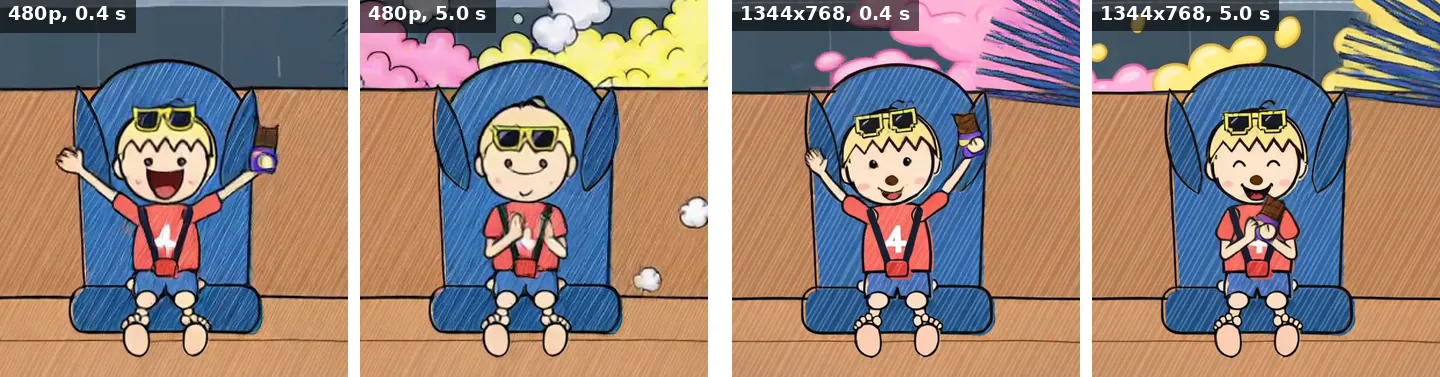
At 480p, with the Q2 text encoder, the 5-second test took 2 minutes after a 7-minute first load, and Leo turned into another boy halfway through it. At 1344x768 a clip like it took about 6 minutes and he held, with crisp lines. 768 pixels is also the shorter side MiniMax sets by default. The extra 4 minutes a shot are what keep a character recognisable, which a series cannot do without.
How long MiniMax H3 takes on an RTX 3070
About 1.2 to 1.4 GPU-minutes per second of finished film, at 1344x768. That includes about 1.5 minutes of model loading per shot, because we ran each shot as its own process so that a run could resume after a failure. The very first load took 7 minutes.
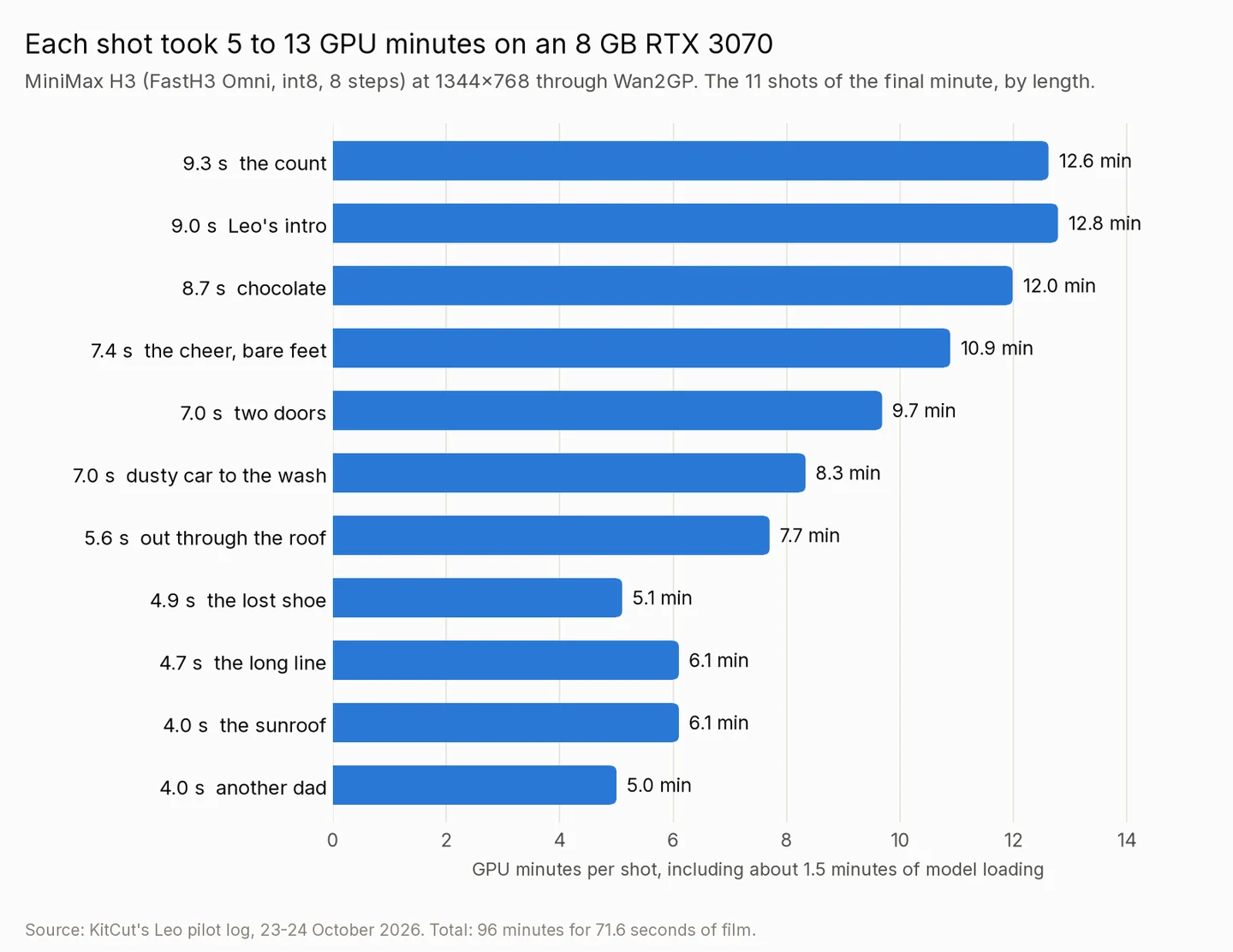
| Shot | Length | GPU time | GPU-min per second | Pictures given |
|---|---|---|---|---|
| 1. Leo's intro | 9.0 s | 12:47 | 1.42 | Leo, cabin |
| 2. Dusty car to the wash | 7.0 s | 8:20 | 1.19 | car |
| 3. The cheer, bare feet | 7.4 s | 10:53 | 1.47 | Leo, cabin |
| 4. The lost shoe | 4.9 s | 5:06 | 1.04 | none |
| 5. The long line | 4.7 s | 6:06 | 1.30 | car |
| 6. The count | 9.3 s | 12:37 | 1.36 | Leo, cabin |
| 7. Chocolate | 8.7 s | 11:59 | 1.38 | Leo, cabin |
| 8. Two doors | 7.0 s | 9:41 | 1.38 | car, Leo |
| 9. Another dad | 4.0 s | 5:00 | 1.25 | street (style only) |
| 10. The sunroof | 4.0 s | 6:06 | 1.53 | Leo, cabin |
| 11. Out through the roof | 5.6 s | 7:42 | 1.38 | Leo, car |
| All 11 | 71.6 s | 96:17 | 1.34 |
An earlier version of the whole minute, before the set pictures were added, took 89 minutes in one pass: 1.24 GPU-minutes per second. For a whole 5-minute episode we budget 6 to 7 hours of machine time, plus a fix pass for the shots a review flags (3 of 11 in our last version). That is roughly one overnight run per episode.
MiniMax H3 on Hugging Face
The official weights are in the MiniMaxAI/MiniMax-H3 repository. The page lists two task checkpoints, Base FL2VA (first and last frame to audio and video) and Base Ref2VA (reference pictures to audio and video), and gives the defaults: 768 pixels on the short side, 24 frames per second, 4 to 15 seconds a clip. The licence is the MiniMax H3 Community License Agreement, and it covers everywhere except the USA, the EU, the UK and South Korea. People and companies there need a licence from MiniMax first, applied for through a form the page links; MiniMax's API has no such limit (licence Q&A).
For anyone writing prompts, two documents in the repository matter more than the weights: the full-reference prompt guide and the base prompt guide. The format below comes from them. FastH3 Omni, the version we ran, is not on that page; Wan2GP downloaded the files it needed the first time we used it.
MiniMax H3 in ComfyUI? We used Wan2GP
We did not use ComfyUI, so nothing on this page is a ComfyUI result. MiniMax's Hugging Face page lists ComfyUI among its recommended frameworks, with a tutorial and workflow templates, alongside SGLang, vLLM and diffusers. We chose Wan2GP for one reason: it runs H3 on a single 8 GB card by streaming it through system RAM, from settings files we could script.
What carries over to any front end is everything about the model: the resolution, the prompt format, the reference pictures and the 17 rules below. What does not carry over is the memory behaviour and the timings, which are Wan2GP's.
MiniMax H3 prompting guide: the six-section format
MiniMax's full-reference guide defines a prompt as six sections, in this order, each holding only its own kind of content:
subject_definitions:
  one line per subject:
  "<Subject 1> is <who, every visible feature>, from <Picture 1>."
summary:
  "[reference generation] <one sentence: what the shot is>"
retention_analysis:
  one line per subject:
  "<Subject 1> (appears in [Shot 1]): fully_preserved - <features> are retained."
detailed_description:
  the style first, then "[Shot 1] ..." and
  "[Shot 2] At 00:03.500, the shot cuts to ..."
overall_soundscape:
  physical sounds only
non_diegetic_music:
N/A when you lay your own music on later- The style opens the description. In this format MiniMax's guide puts it "in one or two English sentences before [Shot 1]". Our first prompts put the style, "no adults" and Dad's rules in
retention_analysis, which is only for how faithfully each picture is kept (fully_preserved, orpartially_preservedwhen only some of it should carry over). - Write 350 to 500 words of description. That is MiniMax's number for a generation task. Ours were 60 to 100 words at first, and the model invented the rest: a yellow taxi interior, a stranger in Dad's clothes. For each shot, write the framing, every subject's look and place in the frame, the surroundings and the light, the actions in order with rough timing, the camera move and what is heard. We hold 180 words as a hard floor; the final shots ran from 204 to 403.
- A camera move is a type, an amplitude and a speed, as in "the camera pushes in with small amplitude at slow speed". MiniMax's base guide lists the types: push in and pull out, truck, pan, tilt, pedestal, arc, tracking, static, zoom and a few more.
- Cuts inside one clip work. "[Shot 2] At 00:04.000, the shot cuts to ..." landed every time we wrote one, with the times increasing and inside the clip's length. The model also cuts by itself when the action needs it: one shot went from a shop front to a shelf to a close-up without being asked.
- Put visible text in double quotes, exactly as it should read. MiniMax's guide asks for it, and it works. Text nobody specified comes out garbled, so describe walls as "plain blank walls".
- The soundscape lists physical sounds only. If a narrator is added later, end it with a sentence that rules out speech (rule 16 below).
A real prompt, in full
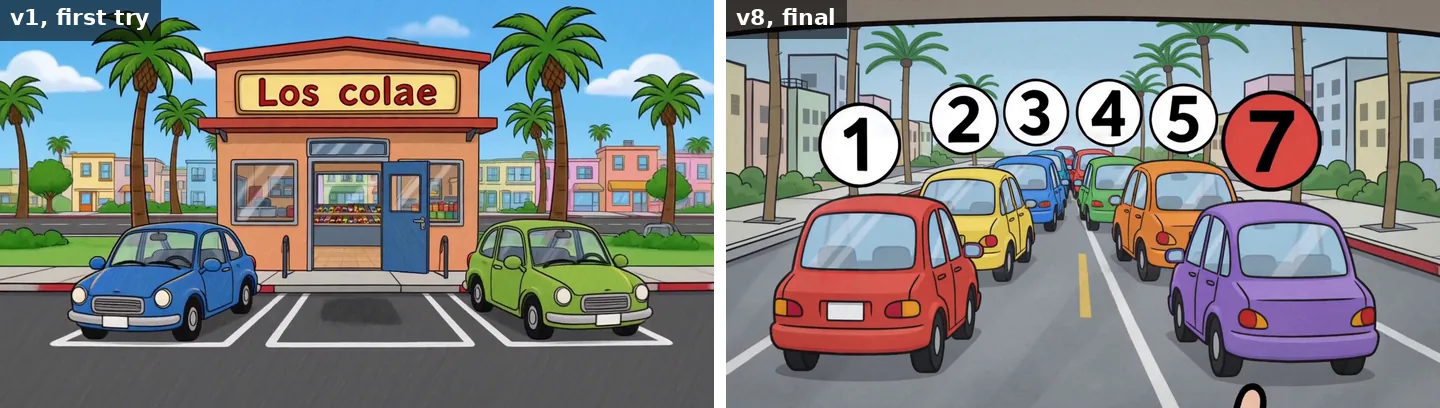
This is the prompt of the count shot (9.3 seconds) exactly as the final minute used it, wrapped for this page. It has two pictures (Leo and the empty cabin), two timed cuts and six quoted numbers, and its description runs to 375 words.
subject_definitions:
<Subject 1> is Leo, a four-year-old boy drawn as a simple doodle: a round peach face
with pink cheeks, big yellow pixel-style sunglasses with black lenses worn over his
eyes, a tiny curved line for a nose and a small smile, a fluffy blond mop of hair
with zig-zag bangs, a coral-red T-shirt with a big white number 4, blue shorts and
bare feet, from <Picture 1>.
<Subject 2> is the inside of the family car seen from the front seats looking back:
a caramel-tan back bench, solid dark charcoal pillars on both sides of the back seat
with small side windows only at the far edges, a glass roof, and a blue child car
seat in the middle of the bench, from <Picture 2>.

summary:
[reference generation] Leo counts the cars in front of him, and skips six.

retention_analysis:
<Subject 1> (appears in [Shot 1]): fully_preserved - his doodle face, the blond mop
with zig-zag bangs, the yellow sunglasses over his eyes, the coral number-4 T-shirt,
blue shorts and bare feet are retained.
<Subject 2> (appears in [Shot 1]): fully_preserved - the caramel-tan bench, the
solid dark charcoal pillars beside the back seat, the small side windows at the far
edges, the glass roof and the blue car seat in the middle are retained.

detailed_description:
The target video is a flat 2D hand-drawn crayon cartoon for young children, in the
exact drawing style of the reference pictures: thick dark outlines, visible diagonal
crayon hatching inside every colour, a soft pastel palette, flat even lighting with
no realistic shading, simple rounded shapes. The setting is a sunny Los Angeles
afternoon. [Shot 1] A medium shot from between the front seats looking back at
<Subject 1>, strapped into his blue car seat in the middle of the bench. The car is
a two-door coupe, its inside exactly as <Subject 2> shows it: a caramel-tan back
bench with Leo's blue child car seat, black shoulder straps and a red chest clip in
the middle, solid dark charcoal pillars on both sides of the bench, small side
windows only at the far edges, a glass roof above, and the two dark grey front seats
with headrests at the bottom corners of the frame. He leans forward against his
straps, raises his right hand and points past the camera towards the cars waiting
ahead, his mouth open in concentration, eyebrows up. [Shot 2] At 00:02.500, the shot
cuts to his own point of view through the windscreen: a long line of small colourful
cars waits in one lane ahead, all facing away, so only their backs and red tail
lights are seen, nose to tail: a red car, then a yellow car, a blue car, a green
car, an orange car and a purple car. His small hand with a pointing finger comes in
from the bottom edge of the frame and taps the air towards each car in turn, and as
he taps each one a white circle pops up above it with a black number: "1" over the
red car, "2" over the yellow car, "3" over the blue car, "4" over the green car, "5"
over the orange car, and then a red circle with "7" over the purple car. [Shot 3] At
00:07.000, the shot cuts back to the medium shot of <Subject 1> in his car seat. He
looks at his own pointing hand with a playful puzzled grin, shrugs with both
shoulders and breaks into a big happy smile, as if the number does not matter. Soft
even daylight.

overall_soundscape:
Muffled idling engines outside, a soft pop with each number, the car interior hum.
There is no speech and no vocal sound of any kind; a narrator is added later.

non_diegetic_music:
N/A
What the format bought
The same 11 shots and the same seed, before and after the six-section format (version 1 against version 5):
| What we counted | First try (v1) | MiniMax's format (v5) |
|---|---|---|
| Shots with Dad's legs, arms or sneakers in them | 5 of 11 | 0 |
| Colours of the car's interior across the inside shots | 3 | 1 (grey) |
| Garbled signs | 2 | 0 |
| Words of description per shot | 60 to 100 | 185 to 372 |
Every written cut in version 5 landed, and the two-door car read as a two-door from the outside at last. The grey interior, though, was our own invention, and it took two more rounds to notice.
17 rules for directing MiniMax H3, each with the defect that taught it
H3 does roughly what the prompt says and fills every gap with its own guesses. Directing it means leaving no gaps, and checking every shot, because no automatic test can see a stranger wearing Dad's shorts. Every defect we found traced back to something we wrote or gave it: the prompt, a picture or an angle. These are the fixes, in the order a prompt gets written.
What the words must do
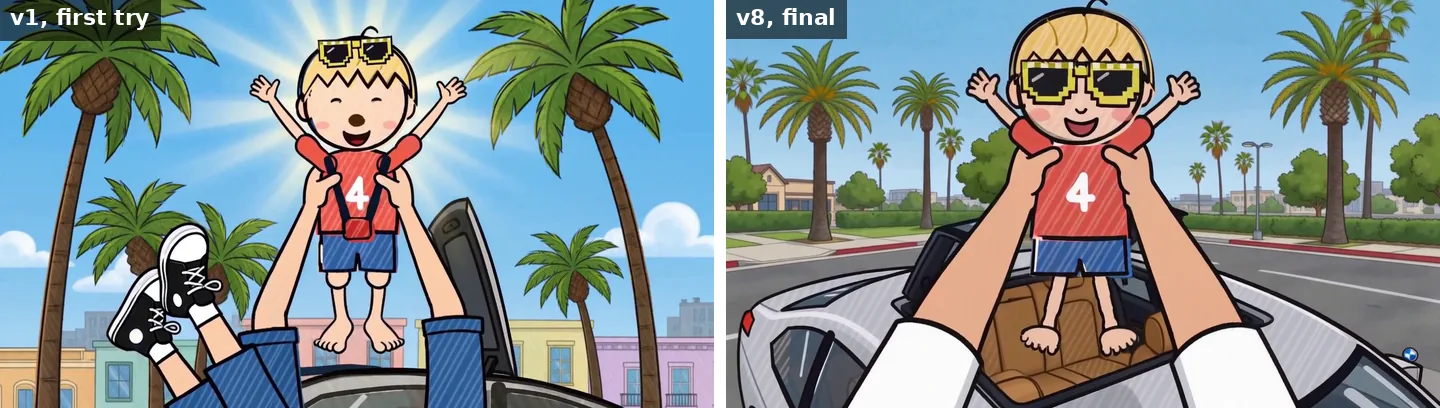
- Say only what is in the frame. Naming something that must stay out tends to bring it in. Every prompt of our first try explained how Dad may appear ("only his hands, or his legs in blue shorts"), and his legs turned up in 5 shots of 11: beside Leo in the back seat, and walking through a street. Write "his feet are bare", not "no shoes, no socks".
- Describe only what this camera can see. In a shot of the car from outside, describing its interior drew a second, empty car seat in the front. From outside, say exactly what shows through the glass.
- A character's notes go only into that character's shots, and a character whose face is never shown is shot through his own eyes. Leo's Dad appears only as hands and legs. "Beyond the left edge of the frame" let a camera tilt bring his face in. Shot from his point of view, with his hands coming in from the bottom of the frame, his face cannot be in the picture.
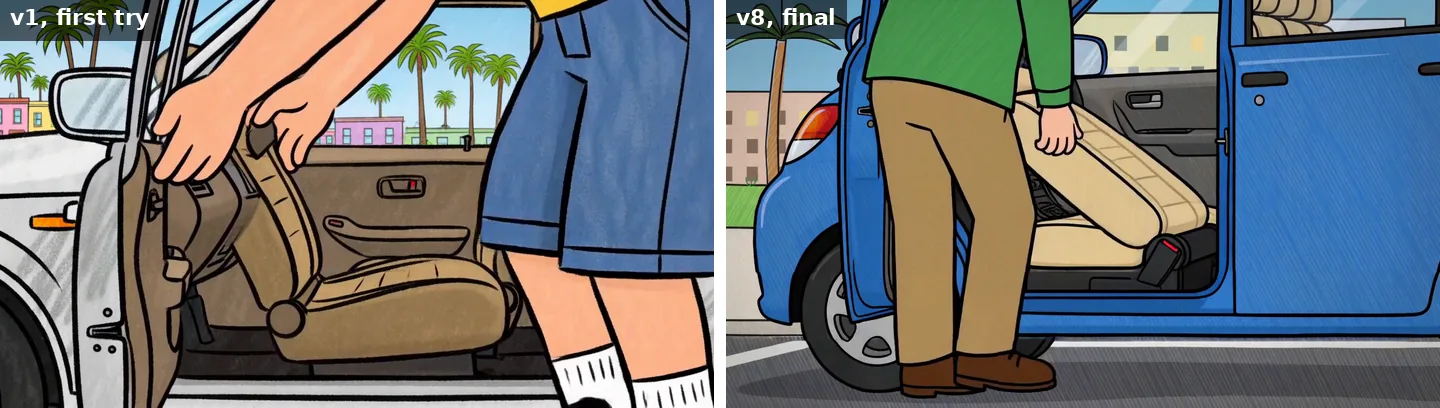
- A stranger gets their own clothes, stated. "Another dad" wore Leo's Dad's blue shorts and sneakers, because Dad's description was in the same prompt. Given a green shirt, khaki trousers and brown shoes, written out, he became someone else.
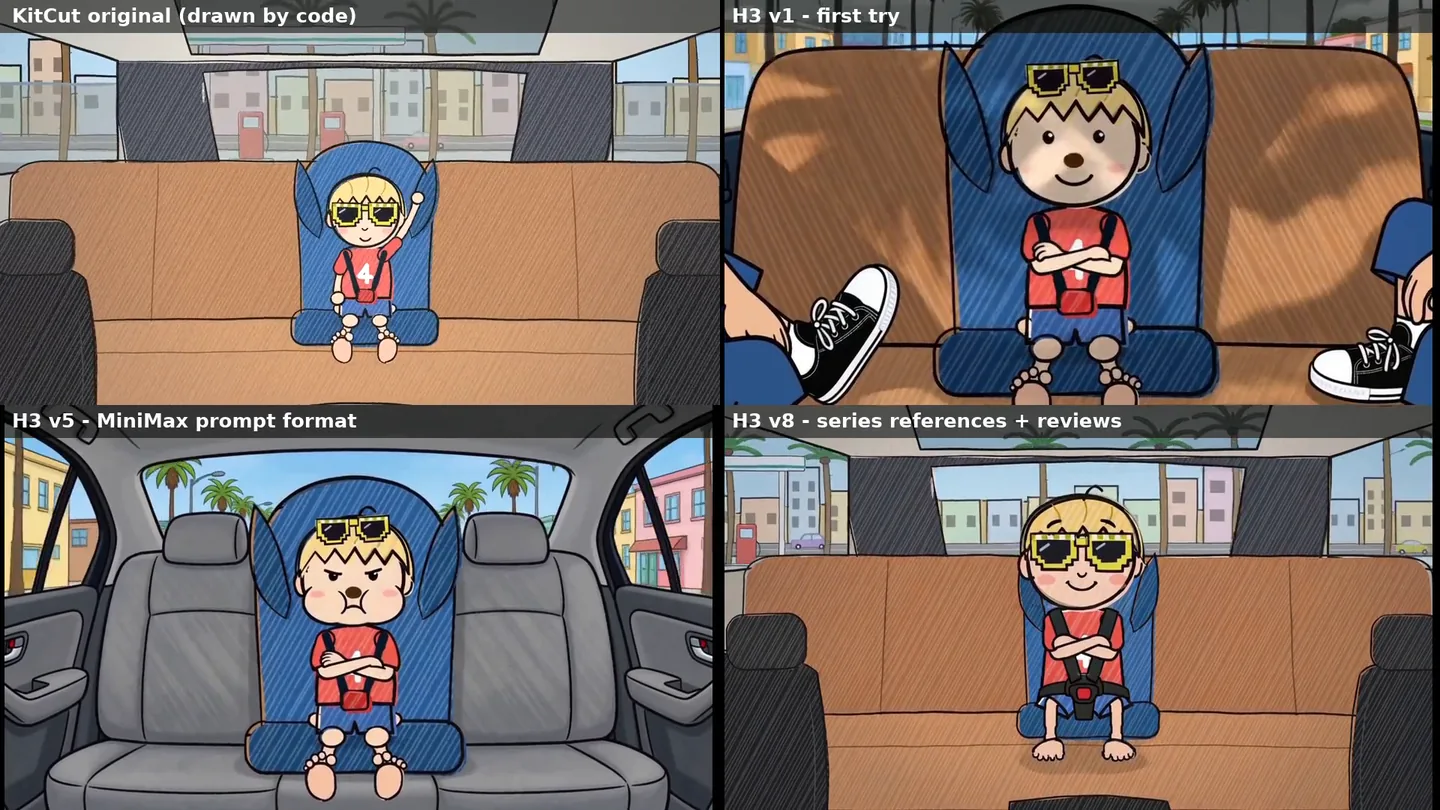
- Describe every place in full, in every shot, as the series draws it. The model has no memory between shots: left unstated, the car's interior was brown in one shot, taxi yellow in another and grey in a third. And describe the place as it really is. We wrote "light grey interior" for three rounds; the series' car has a caramel-tan bench between dark pillars, and the model faithfully drew our invention.
- Light words change faces. "Palm-tree shadows sliding across him" made Leo's face brown. Ask for "soft even daylight on his face".
- Name the emotion, not the face. "Puffs out his cheeks and narrows his eyes" read as a sulk, and "frowning with concentration" as worry. Write "a proud, confident smile" or "counts cheerfully".
- Track each thing's state from shot to shot. The car is dusty until it has been washed. One "now clean and shiny" in a queueing shot put a spotless car in the line for the car wash.
The pictures you give it
- Give every character and every place its own clean picture. Pictures of Leo and of the car kept both recognisable from shot to shot. Draw each character alone, large, on a plain ground, as they look in the part being re-shot. Don't crop one out of a finished frame: our first Leo picture, cropped from the episode, brought his car-seat harness into a shop, and a chocolate smudge from a later scene became "a brown button nose" in every shot. Draw each set empty too: the car's interior with nobody in it took the inside shots from a generic car to the series' caramel bench and dark pillars, while the model still chose the camera and the acting. And don't use the original's frames as first and last frames: the clip comes out clean but looks exactly like the original. Use them only to bridge two shots.
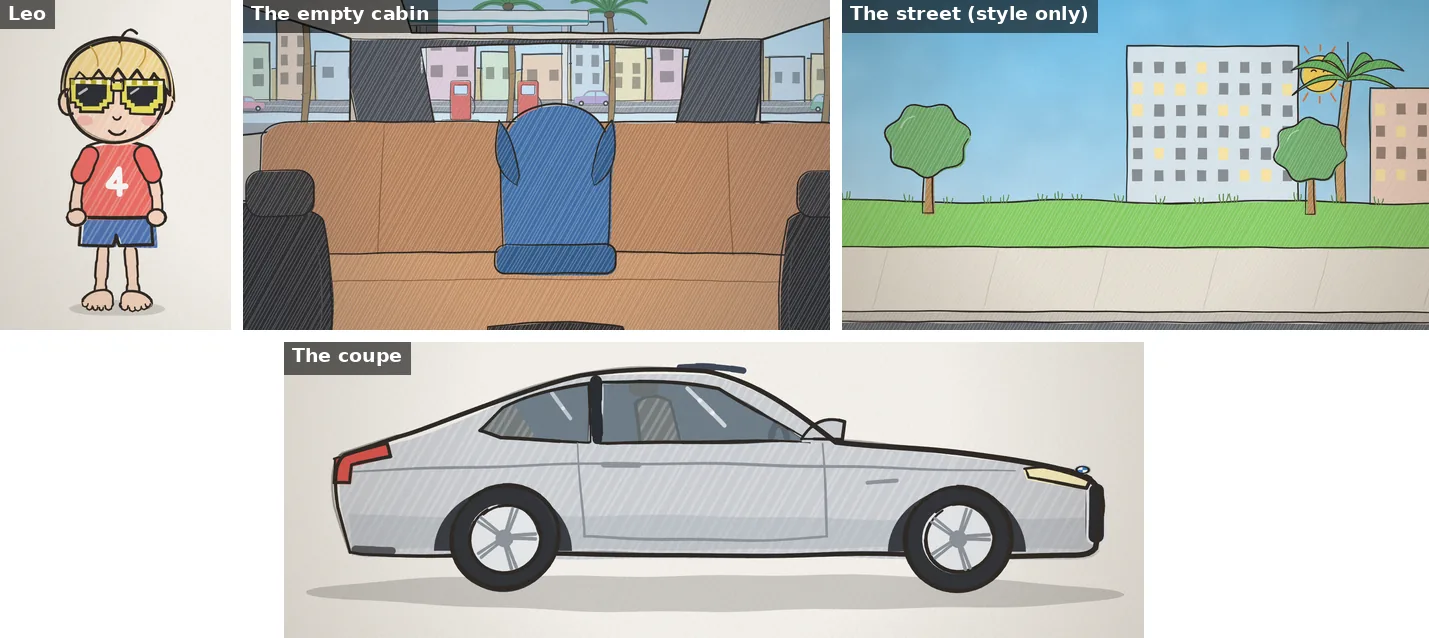
- A shot with no character in it gets no character picture. Otherwise the model tends to put that character in. The floor-level shot of the lost shoe, with no picture at all, came out exactly as written, in the series' look.
- But it still gets a style-only picture. With no picture at all, the "other dads" shot came out in a heavier crayon than its neighbours. Now such a shot gets the series' street, drawn alone, marked
partially_preserved: only the drawing style is kept, and the place is a different one. Honestly, by eye it changed little; of the 17, this rule has the thinnest evidence. - Number the subjects in picture order, and check them.
<Subject 2>means the second picture of that shot. When we renumbered with two find-and-replace passes in a row, one label was swapped twice. Renumber in one pass and check every prompt before spending GPU time: our shot builder fails a prompt whose label sits next to another subject's words.
Staging and story
- Size each shot to its line of narration. Each shot fills the time from one line's start to the next, between 4 and 15 seconds. Under 4 seconds, merge it with a neighbour. When assembling, trim or hold each shot to its exact slot.
- The picture must tell the narration's joke at the moment it is said. Read every shot against its own lines, not just the episode's plot. Version 5 cut to the chocolate shelf 6 seconds before the narrator says "Chocolate", took Leo out of the car he was queuing in, and kept rear doors beside him while the narrator said he sits next to neither door. State every object a joke rests on (a queue seen from behind, with its tail lights; a two-door car whose seat visibly tips forward), and put a reveal on its word with a timed cut ("At 00:07.000").
- Show what a character sees through his own eyes, not over his shoulder. Over Leo's shoulder the queue he counts was in the picture, but the model split him from his car seat: an empty seat beside him, and Leo standing on the bench. Cutting works instead: Leo from the angle his set picture covers, then his point of view with his finger tapping each car from the bottom of the frame, then back to him.
Sound and review
- If a narrator speaks over the film, ask for no speech, and check. The soundscape lists only physical sounds and ends: "There is no speech and no vocal sound of any kind; a narrator is added later." Speech recognition found 0 words in the model's own audio across three versions of the minute. Run the same check on the finished mix as a positive control: it found all 116 words of narration. Without that, "0 words" proves nothing.
- Have a fresh reviewer compare the minute with the original's same minute. A separate AI reviewer with no notes from us found the story faults we had missed while checking each shot's technique: jokes landing early or not at all, and the wrong emotion. Its verdict on version 8 was "NOT YET, but close": it "reads as the same series", and a parent would pick it over the original. A last pass fully fixed two of its three remaining points. (Briefing an AI reviewer well is its own skill; we wrote about it in Our AI video reviewer had perfect taste and only found small things.)
The review loop: fix the prompt, not the seed
We looked at every shot at one frame per second as it landed, on a contact sheet, not just at the finished minute, and wrote each defect down with its cause. Each fix became a new prompt version, eight in one night, and the old shot stayed as the baseline. An experiment changed one thing on one shot and kept everything else fixed.
The most useful experiment was the yield test: the same shot with seeds 42, 7 and 99. All three were usable and nearly identical, with the same beats in the same order and nearly the same framing (12:47, 12:53 and 12:57 of GPU time). H3's failures were systematic, the same on every seed, so a fixed prompt stays fixed. An episode needs one render per shot and one fix pass for the shots the review flags, not five takes of each shot and a person choosing.
Wan2GP traps on an 8 GB machine
- Blank lines split the prompt. Set
"multi_prompts_gen_type": "FG"in every settings file (see the settings above). configis read by position. For FastH3 Omni its slots are Text Encoder, Video VAE and DiT Denoising Priority, and a value in the wrong slot is dropped without a warning. Ours readgguf_q4_k_m,lower_ram, so every shot ran at the default, Lower VRAM; Lower RAM would have beengguf_q4_k_m,,lower_ram. Wan2GP writes theconfigit applied into each video's metadata, so check it there.- A refused shot exits cleanly. Check that the output file exists after each run.
- Cap the memory if the machine does anything else. Ours ran under 22 GB of RAM and 2 GB of swap.
- The model's sound is loud. H3's own audio is far louder than the episode's effects track: it needed about -18 dB to sit where the episode's sound effects did.
What MiniMax H3 still gets wrong
- Strong ideas about ordinary things. The model's idea of a car interior, with four doors and handles beside the back seat, beat our words in every version until we gave it a picture of the series' own interior. The stranger's car still has a second door: text alone lost to its idea of "a small car". The next step is a drawn picture of that car too.
- Angles nobody drew. A picture only holds the angles it shows: a cut to a side view of Leo's feet brought back a generic door with a handle.
- Hands and feet in close-up. A 4-second, soles-on close-up of Leo's bare feet came out with five or six bulbous toes per foot. A short shot from the front or the side read naturally.
- A slightly different finish outdoors. The final review found the outdoor shots a little brighter and glossier than the inside ones (the inside shots are the ones with the series' set as a picture).
- Small continuity notes: at 0:09 nobody is visible in the car, and at 0:13 the car at the wash looks smaller.
- Open questions we have not measured: whether 9-second shots hold up as well as 5-second ones, and whether the full 350 to 500 words of description beat about 250.
Where H3 wins, and where drawing by code still wins
H3 wins on acting and camera. Leo's face reacts: a proud grin, a shrug after "seven", his tongue out at the thought of chocolate. In our first try the model also chose its own camera moves, such as a crane up over the queue. One fresh review found the first half of version 5 better than the original: it looks like real TV animation.
Drawing by code wins on exactness. Code does what it says; every H3 shot has to be checked by eye and some redone, and its best shots here started from pictures our code had drawn. So H3 can carry the picture of an episode of this series, for about a night of machine time and a careful review. For explainers, where every number, map and source must be right, we still write the film in code (Seedance, Sora and Veo make clips. An explainer needs code).
How we tested, and the limits
- One pilot: the first 71.6 seconds of Leo episode 12, "The Car Wash", re-shot as 11 shots on the night of 23 to 24 October 2026, in eight prompt versions.
- One machine: an RTX 3070 with 8 GB of VRAM and 32 GB of RAM, every job capped at 22 GB of RAM, Wan2GP 18.21 with FastH3 Omni (18.81, current on 25 October, has the same setting names). Times are wall-clock minutes per shot as logged, each shot a separate process including model loading.
- One look: a flat 2D crayon cartoon for young children. Photoreal or 3D styles may behave differently; we have not tried them.
- Seed 42 throughout, except the yield test (seeds 7 and 99).
- Reviews: our own, at one frame per second, and a separate AI reviewer with no notes, comparing against the original minute: one model judging another's work, as when we test image generators automatically. No audience test.
- Speech checks: faster-whisper's small model on the model-only audio, with the finished mix as a positive control.
- Leaderboards are as published on 25 October 2026 (Artificial Analysis) and 22 September 2026 (Arena's dataset), and they change.
- Where the numbers come from: our pilot log and shot builder for every time, word count and defect; Wan2GP's own model definitions for the setting names, the settings it saved in each shot for what actually ran, and the files it downloaded for the download size; MiniMax's Hugging Face page, licence and prompt guides for the model's specifications, terms and format; MiniMax's pricing page for the API prices; the two leaderboards for the rankings.
FAQ
Can MiniMax H3 run on an 8 GB GPU?
Yes. We ran it on an RTX 3070 with 8 GB of VRAM and 32 GB of system RAM, through Wan2GP, which streams the model through system RAM. The settings were FastH3 Omni (int8, 8 steps) with a Q4 text encoder at 1344x768, and every job stayed under a 22 GB RAM cap. MiniMax's own deployment example spreads the model across four GPUs.
How long does MiniMax H3 take to make a clip on an RTX 3070?
About 1.2 to 1.4 GPU-minutes per second of finished video at 1344x768, including about 1.5 minutes of model loading per shot. A 4-second shot took 4 to 6 minutes and a 9-second shot 11 to 13. The 11 shots of our final minute took 96 minutes for 71.6 seconds of film.
Does MiniMax H3 work in ComfyUI?
We did not use ComfyUI, so we can't say how it behaves on an 8 GB card. MiniMax's Hugging Face page lists ComfyUI among its recommended frameworks, with a tutorial and workflow templates. We used Wan2GP because it runs H3 on one 8 GB GPU from a settings file; the prompt format and the rules in this article are about the model, not the front end.
Where can I download MiniMax H3?
The official weights, the licence and MiniMax's prompt-writing guides are in the MiniMaxAI/MiniMax-H3 repository on Hugging Face. The MiniMax H3 Community License Agreement covers everywhere except the USA, the EU, the UK and South Korea; there, you need to apply to MiniMax for a licence first. The FastH3 Omni version we ran is not on that page; Wan2GP downloaded the files it needed the first time we used it.
What resolution should I use for MiniMax H3?
We used 1344x768 and would not go lower for anything with a recurring character. At 480p a 5-second test was about three times faster, but our character turned into a different boy halfway through it; at 1344x768 he stayed himself. 768 pixels is also the shorter side MiniMax sets by default.
How long should a MiniMax H3 prompt be?
MiniMax's guide says the detailed description of a generation prompt is normally 350 to 500 words, inside a six-section prompt. Our first prompts had 60 to 100 words of description, and the model invented the rest, including a stranger in Dad's clothes. We now treat 180 words as a hard floor; the shots in our final minute had 204 to 403.