 KitCut
Real logo, real map, real people
An AI model is very good at plausible. Ask it for a delivery company and it draws a nice truck with a made-up name on it. Ask for the street outside an open house and it draws a tidy grid. The trouble is that the people a film is for know the real thing. They know the logo on their parcels, the streets round their house and the face of the agent selling it, and a stand-in tells them at once that nobody checked. Here are four rules we added to how KitCut makes films, and the film behind each one.
1. Real names and real logos
Our first films used stand-ins: "a delivery company", "an AI coding tool". They were never wrong, but they never felt like anything either. The rule came while we were making episodes for a Ukrainian children's channel about how things work: "Be always specific... specific company names and logos. So users could be connected to the reality." So the episode on parcel delivery names the actual delivery companies a Ukrainian family uses, and the one on making games names Claude Code, Codex, Scratch and Roblox.
Two things make that work:
- The logo is a file, not a drawing. We attach the real logos and tell the film to use them exactly as they are, never redrawn. A model asked to draw a famous logo from memory gets it nearly right, and nearly right is worse than not at all.
- The facts come with sources. A film on a real product launch once came out "too simple, primitive, and looks very low effort", partly because the studio couldn't look anything up. Now web search is always available, and a fact sheet can be attached; every number on screen comes from one or the other.
The same channel taught us the failure mode in the other direction. One episode drew its own emblem for the channel instead of using the real one, and that invented logo was then saved among the channel's pictures for later episodes to reuse. A project in KitCut now holds its brand: the real logo, colours and fonts that every episode uses.
2. A real map for a real address
Our open house template ended on a map: a pin on the house, the street highlighted, a photo of the home above it. It looked fine, until you looked at what the map was. A ruled grid, two green ovals for parks, one line lit up as "the street". Nobody who lives there would recognise it.
The rule: "For all videos we create with maps that show pins or specific address, we need to use real map instead of a fake one."
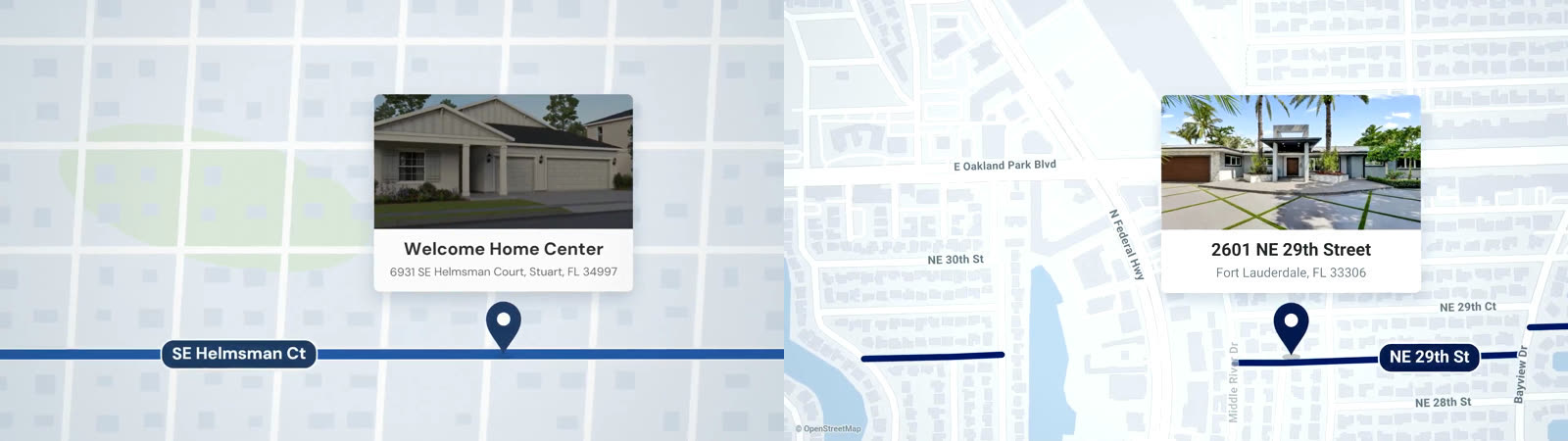
Every film now has a map tool. Give it an address and it draws the real neighbourhood from OpenStreetMap: streets, buildings, parks, water and coast, with real street names lettered on and the credit shown. It also says how exactly it found the address: the house itself, its block, or only its street. And it refuses an address whose street isn't on any map, like a new development still being built. Then the film shows the address in type rather than fall back to a drawn map.
We proved it two ways. The template, given one sentence and some photos for a different listing in another state, drew that listing's own neighbourhood. And a plain prompt about a farmers market, with no template at all, reached for the map tool by itself.
3. Real people sell
The same template showed the house, the dates and the address, and no person. The founder's note: "People buy from real people and we need photos."
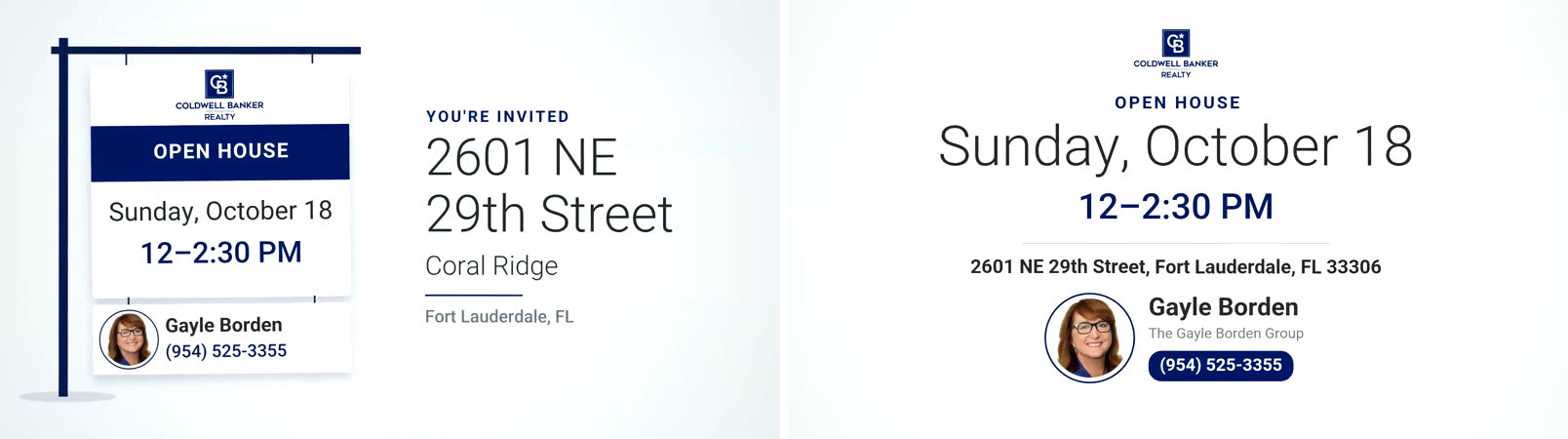
The agent's photo now goes where a viewer decides to call: on the rider under the yard sign at the start, and beside the name and number at the end. One choice we made carefully: the example uses the listing's own agent, with the headshot from the brokerage's own page. Putting a stranger's face on a listing that isn't theirs would be a false claim about a real person. When you make your own, it's your photo, never a stock or generated one. With no photo, the name stands alone.
You can watch the film, or make one for your own listing from the open house template.
4. Real brands have real rules
A sponsor template for a tech conference once showed a sponsor's logo being struck into a metal coin by a press. It passed our checks and two test remakes. The founder's verdict was quick: it was cringe, and it didn't use their style book either.
They were right on both counts. That sponsor's brand standards ask for the logo flat, on a plain ground, with clear space round it: no metal, no shine, no 3D. The conference's own social cards looked nothing like the film. We had told the studio "use the event's own look" and never opened either style book ourselves.
The rule now: before a film carries someone else's brand, look at their real material (their site, their own social posts, the logo page of their brand standards) and put what it says in the brief. Someone else's logo sits flat and still, on a solid panel, with room round it. The motion belongs to the panels and the type. A prop carrying someone's logo is the warning sign.
Why this matters more for AI video
A human designer making an open house video would open a map, call the agent for a headshot and download the brokerage's logo, because those are the obvious first steps. A model skips them because it can make something that looks fine without them. So the steps have to be built in: a map tool, attached logos, a fact sheet, a brand kept with the project, and a rule that says when to use each.
- Give the model the real material, not a description of it.
- Prefer type to a fake. If the real map, logo or photo isn't available, show the words.
- Check against the people who know. Your reviewer, human or AI, should ask "would someone from there recognise this?"
How to attach logos, photos and fact sheets to a film is on Making a film, and how a project keeps a brand for every episode is on Characters and projects. For real people in films, see why we draw them rather than deepfake them, and for why our automated reviewer passed the coin, Our AI video reviewer had perfect taste and only found small things.