 KitCut
A faceless YouTube channel, run from your AI assistant
A faceless channel needs the same things every week: a topic worth watching, the research behind it, a story told well, a video, and a regular day it goes up. KitCut makes the video: Claude writes it, draws every scene, narrates it and scores it. Connect KitCut to the AI assistant you already use, and the assistant can do the rest of the week's work with it: look things up, write the episode, keep the series on plan, and put each video on your channel's calendar. With a scheduled task, it does that on its own, while you are away.
It works with Claude, ChatGPT, Grok, Meta AI (Muse), Claude Code and any agent that connects to remote MCP servers. Connecting has the steps for each.
The quickest way: let your agent set it up
Paste this into your AI assistant or agent:
Connect the KitCut MCP server at https://kitcut.ai/mcp, read https://kitcut.ai/docs/agents.md, and help me start a faceless YouTube channel with it.
Agents that can add MCP servers themselves, such as Claude Code, do the rest. In a chat app, add the connector yourself (Connecting). Either way, you sign in to KitCut and press Allow.
What your assistant does with KitCut
- Research. Claude and ChatGPT can search the web and read sources. Ask for an episode "with real sources", and the facts they find go into the film's idea (up to 30,000 characters), so the narration sticks to them.
- Storytelling. The assistant turns the research into a story: a hook in the first seconds, a narrator's lines, an ending that leads to the next episode. Characters you used before come back by name, and a project's brief keeps the tone, the narrator and the music the same in every episode.
- Planning. One tool gathers everything to plan from: how each episode did on YouTube (views, how much of it was watched), the ideas saved as drafts, what is scheduled, the channel's pace and its next free day, and the credit left. The assistant suggests the next episodes from it, you keep the ones you like, and they are made in turn (Planning the next videos from a chat).
- Making them in a row. Ask for several episodes at once: the ones that do not fit right away wait in your account's line and start by themselves when there is room (2 at a time on Pro, one on the other plans).
- Publishing. For each video, KitCut writes the title, description and tags in your channel's voice, makes four thumbnails, and schedules it on the channel's next free day, or the day you say. A project can publish every new episode by itself at a set time (YouTube from a chat).
- Reading the numbers. The assistant can read your channel's own YouTube Analytics back (views, minutes watched, subscribers, where the views came from) and plan the next episodes from what worked.
A faceless channel, step by step
- Pick a niche and make a project on kitcut.ai/studio: a name, and a brief that says who it is for, the tone, the narrator, and how each episode opens and closes. Add your channel's logo as a picture named "logo". The assistant can also do this for you in the chat.
- Connect your YouTube channel on your account page. Until Google finishes verifying KitCut, Google shows a warning on the way (YouTube).
- Connect your assistant (below).
- Make the first episodes together. Ask for ideas, pick, and ask for the films. Watch them, and keep the narrator's lines you like: later episodes say the same words the same way.
- Choose when they go up: a day and time for each, the channel's next free day, or every new episode by itself.
- Put it on a schedule (Videos on a schedule): the assistant makes and schedules the next episode every day, or every week, without being asked.
Connecting
KitCut's address for assistants is https://kitcut.ai/mcp. You sign in to KitCut on its own page and press Allow; the assistant never sees your sign-in. kitcut.ai/connect has the same steps.
| App | How |
|---|---|
| Claude (web, desktop, mobile) | Customize → Connectors → + Add → Add custom connector. Name it KitCut, paste https://kitcut.ai/mcp, press Continue, sign in to KitCut and press Allow. On Team and Enterprise plans an owner adds it first. |
| ChatGPT | Settings → Apps → Advanced settings → Developer mode, then Create app with https://kitcut.ai/mcp and OAuth; sign in and press Allow. Which ChatGPT plans can add their own apps is up to OpenAI. |
| Grok | grok.com → Connectors → New connector → Custom. Paste the address, choose OAuth, and sign in. |
| Meta AI (Muse) | Add https://kitcut.ai/mcp as a connector, sign in to KitCut and press Allow. |
| Claude Code | claude mcp add --transport http kitcut https://kitcut.ai/mcp, then /mcp, pick kitcut and sign in. |
| Other agents | Any agent or app that connects to remote MCP servers with OAuth (Streamable HTTP): add the address and sign in. |
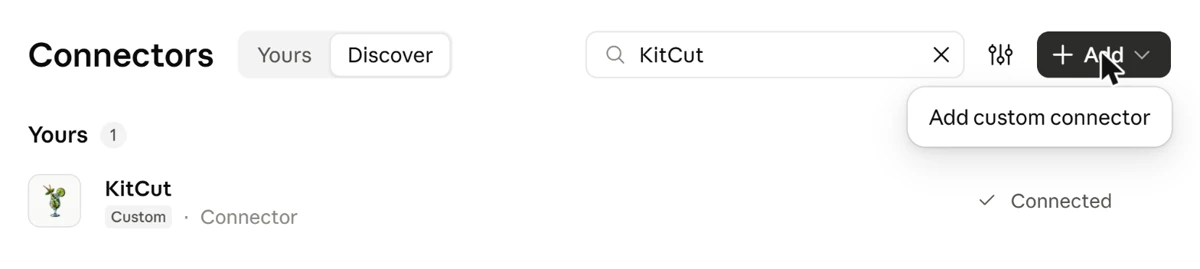
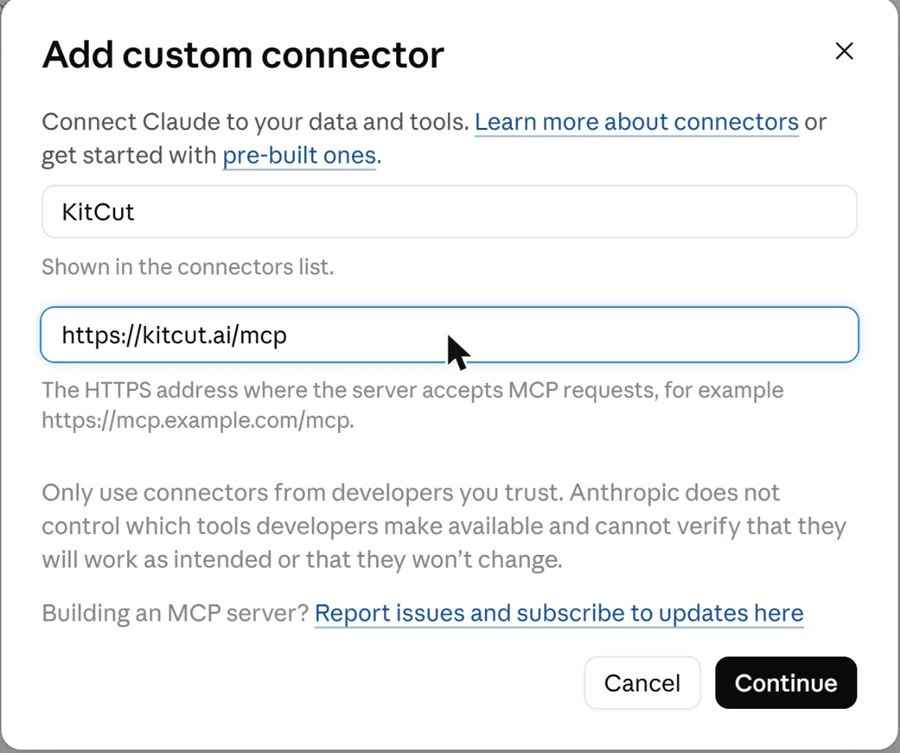
You can disconnect an assistant at any time on your account page, under "Connected assistants".
Videos on a schedule
A scheduled task is a message the assistant sends itself at set times. Give it the instructions once, and it uses KitCut on each run: research the next topic, write the episode, make it, and schedule it on the channel.
Claude
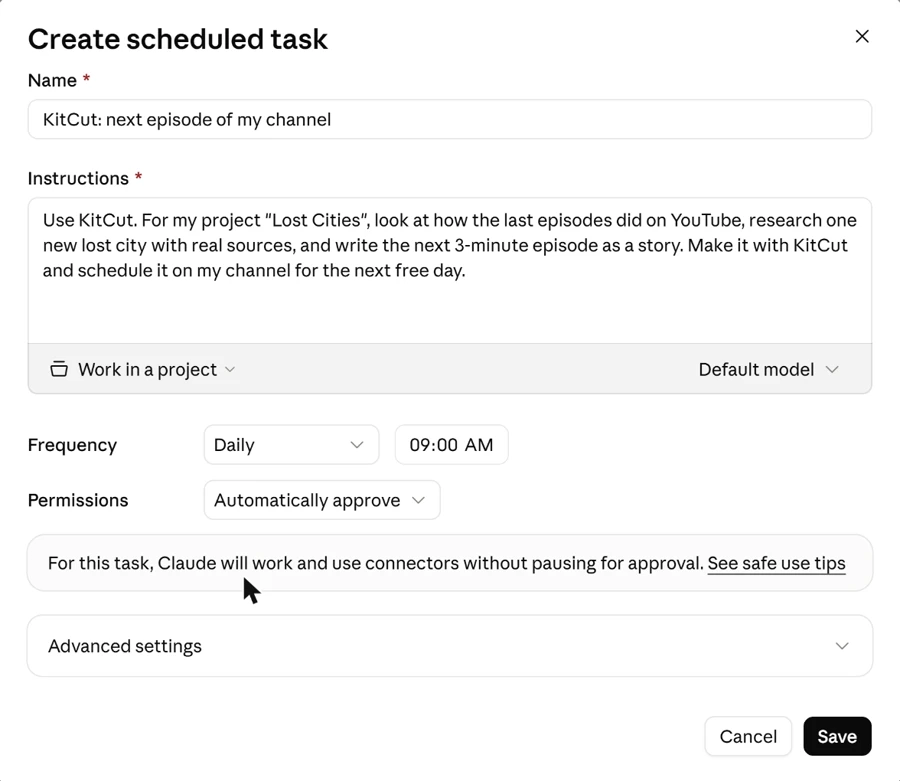
Scheduled in the sidebar, then New task → Set up manually:
- Name and Instructions: what to do on each run, as you would say it in a chat.
- Frequency: hourly, daily, on weekdays, weekly or monthly, at a time you pick.
- Permissions: with Automatically approve, Claude "will work and use connectors without pausing for approval", so it can start films and schedule them on its own.
Claude's scheduled tasks run in the cloud, so your computer can be off. They come with Claude's paid plans.
ChatGPT
Scheduled in the sidebar lists your tasks, where you can make new ones and pause, edit or delete them. A task can use the apps connected to your ChatGPT. An action that changes something outside ChatGPT can wait for your approval, and the task pauses until you give it, so look at the first runs. How many tasks you can have depends on your ChatGPT plan.
Other agents
Claude Code has scheduled tasks and routines of its own, and any agent that runs on a timer (a cron job, a workflow tool) can do the same with the address above.
What a scheduled run uses
- Credits, as any film does. A run with too little credit left makes nothing and says why. Check your plan covers what the schedule asks for: a daily 3-minute episode is about 90 minutes of film a month.
- One film at a time on Standard (2 on Pro): episodes asked for together wait in your account's line.
- 20 publishes a day per account.
- Watch the first few runs before you leave a task to itself, and keep Automatically approve for tasks whose instructions you trust.
Prompts to start with
- "Look at how my channel did this month and suggest five ideas for the next episodes of Lost Cities. Save the ones I like as drafts."
- "Research the Library of Alexandria with real sources, write a 3-minute episode with a hook in the first ten seconds, and make it with KitCut as the next episode of Lost Cities."
- "Make the next three drafts of Lost Cities, one after another, and schedule each on my channel's next free day."
- "Every Monday: read last week's views, make the episode that fits best with what worked, and schedule it for Thursday at 18:00." (a scheduled task)
Ideas for faceless channels
- History and mysteries: lost cities, strange events, one person's life in three minutes.
- Explainers: how money works for teenagers, the science behind everyday things, one economics question per episode.
- Stories with recurring characters: a bedtime series, a fable each week, the same fox in every episode.
- Summaries: a book, a battle, a scientific paper, told as a story with the sources in the description.
- Shorts: ask for a 9:16 film for a YouTube Short (Shorts from a chat).
Every look works for a series: hand-drawn, painted or collage (Looks).