 KitCut
Plans and credits
KitCut is paid for in credits: one credit is one second of film. Every film uses at least 30 credits. New accounts start with a free trial of a plan (7 days, card needed); accounts made before that keep Free, 30 seconds of film to start and in many countries again every month. Pro is a monthly subscription that gives more minutes, makes films up to 8 minutes, makes them first when the service is busy, and makes 2 at the same time.
| Plan | Price a month | Film a month | Longest film | Frame rate | Made first when busy | Films at once | KitCut mark |
|---|---|---|---|---|---|---|---|
| Free | $0 | 30 seconds; once where Free does not refill | 1 minute | 30 fps | no | 1 | yes |
| Pro | $45 to $849 | 10 to 240 minutes | 8 minutes | 60 fps | yes | 2 | no |
Free in practice: the free credits (30) make one film of up to 30 seconds. Free films can be up to 1 minute, but a longer one needs bonus credits on top.
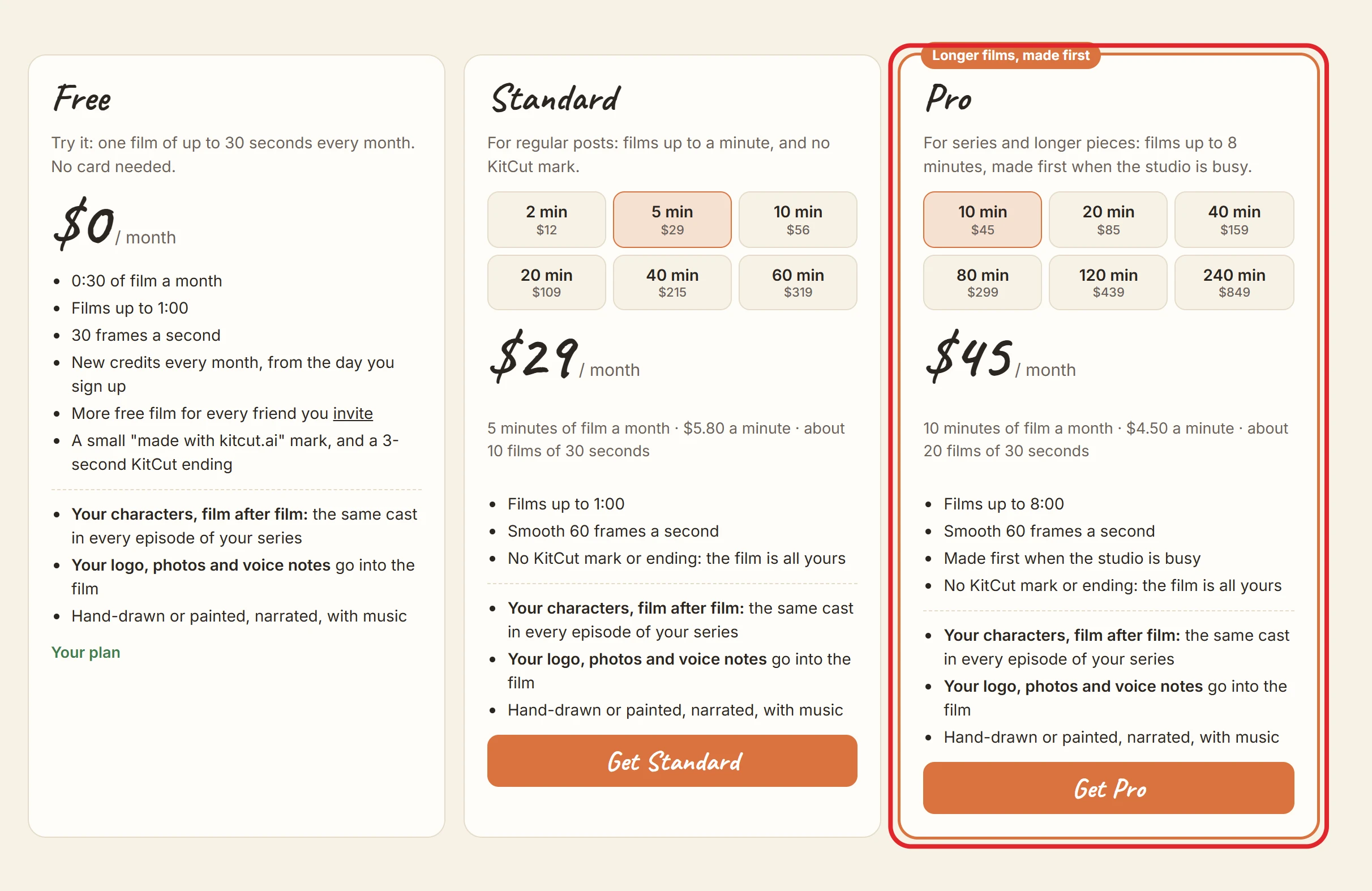
Pro is the paid plan on sale. Standard (from $12 a month, films up to 1 minute) was sold until 22 October 2026; a workspace on it keeps it, can change its amount and can move to Pro, but nobody can start it.
All plans make the same films with the same tools: all three looks, pictures and voice notes, characters that come back, projects, and a page for every film. Plans differ only in:
- how much film you get a month;
- how long one film can be;
- whether Claude can choose a film's length (paid plans);
- priority;
- how many films are made at the same time;
- the KitCut mark.
Moving from Free to a paid plan also takes the mark off films already made (a trial's own films lose it by themselves when its first month is paid, see Free trial): each of them has a Remove branding button on its page, which draws the same film again without it, at 60 frames a second, for no credits (Removing the mark from a film). A checkout started from a film's own offer comes back to that film and removes its mark without being asked again.
Paid plans, by the minute
| Plan | Minutes a month | Price a month | Price a minute |
|---|---|---|---|
| Pro | 10 | $45 | $4.50 |
| Pro | 20 | $85 | $4.25 |
| Pro | 40 | $159 | $3.98 |
| Pro | 80 | $299 | $3.74 |
| Pro | 120 | $439 | $3.66 |
| Pro | 240 | $849 | $3.54 |
Prices are in US dollars, billed monthly in advance by Stripe. Promotion codes are accepted at checkout.
How credits work
- Cost: a film uses its length in seconds, and at least 30. A 45-second film uses 45 credits; a 10-second film uses 30.
- A film from a template uses about the template's length: rounded up to the next 5 seconds, and at least 30, which its page shows as "about N credits". A template longer than the plan's longest film needs a plan that allows it (Templates).
- A film whose length Claude chooses (paid plans, Look, length and frame) holds the longest it may be when it starts: the plan's longest film, or the balance if that is less. As soon as Claude has picked the length, what the film doesn't use comes back, and it is charged its own length, at least 30.
- A round of changes to a finished film uses the seconds its notes cover, at least 5 and never more than the film's length. The first round on a film uses none (What a round of changes uses).
- Pictures above a draft: each level is a part of the credits the film's length uses: Draft none, Standard 25%, High 60%, rounded up and at least 5. One rule both ways:
- A film started at Standard or High (a collage, or an episode of a project painted by GPT Image) uses its credits plus that part: a 60-second film 75 or 96 instead of 60 (Look, length and frame). It is held, charged and given back with the film.
- Sharper pictures for a finished film use the difference between its level and the one asked for: from a draft 15 or 36 for a 60-second film, from Standard to High 21. They are never the film's included round (Sharper pictures).
- Held, then charged:
- When a film is asked for, its credits are held (taken from the balance).
- They are charged only when the film is finished.
- A round of changes is held when its notes are sent, charged when the new version is made, and given back when it is not: it failed, it was stopped, or Claude changed nothing. Sharper pictures are held, charged and given back the same way.
- Given back automatically when a film fails, is stopped, is interrupted, or is refused.
- A film with no result after 6 hours, plus 45 seconds for every second of film, has its credits given back.
- Order: credits are spent from the batch that expires soonest.
- Too few credits: a film that needs more than the balance is refused before it starts ("This film needs m:ss of credit and you have m:ss").
Where Free refills every month
An account made before the card was asked at sign-up (October 2026) started with 30 seconds of free film, enough for one film, with no card; whether that comes back every month depends on where the account was made. An account made since then starts with a free trial instead: the card is asked at sign-up, and there is no free film before the trial starts.
- It refills every month for an account made in: Australia, Austria, Belgium, Bulgaria, Canada, Croatia, Cyprus, Czechia, Denmark, Estonia, Finland, France, Germany, Greece, Hungary, Iceland, Ireland, Israel, Italy, Japan, Latvia, Liechtenstein, Lithuania, Luxembourg, Malta, Netherlands, New Zealand, Norway, Poland, Portugal, Romania, Singapore, Slovakia, Slovenia, South Korea, Spain, Sweden, Switzerland, Ukraine, United Arab Emirates, United Kingdom, United States.
- Everywhere else it is given once. The account keeps everything else Free has: welcome bonuses, invitation bonuses, films up to 1 minute, and any paid plan.
- Decided once, at sign-up, and it does not change afterwards: travelling, moving or a VPN later makes no difference.
- Two things are read at sign-up: the country the request comes from, and the country the device's clock is set to (the browser's timezone). Both must be in the list. So an account made through a VPN is sorted by where the device is, not where the VPN comes out. A country that cannot be told (Tor, for instance) counts as outside the list.
- Accounts made before 2026-10-12 refill every month, wherever they were made.
- Paid plans are the same everywhere.
- The account page says which it is: "0:30 of film every month", or "One free film to start, with no monthly refill". Got the wrong one, for instance signing up while abroad? Write to [email protected].
When credits arrive and expire
| Plan | When credits arrive | When they expire |
|---|---|---|
| Free, where it refills (below) | 30 seconds every month, on the day of the month the account was made. They appear the first time the account is used in that month. | at the end of that month; they don't carry over |
| Free, everywhere else | 30 seconds once, when the account is made | a month after the account was made |
| Pro (and Standard) | the plan's minutes, each time a monthly payment goes through | at the end of that billing month; they don't carry over |
| Bonus credits (given by KitCut) | when given | when stated; by default never |
| Welcome bonus (below) | the moment its link is opened | after 365 days |
| Invitation bonus (Invite friends) | when an invited friend's first film is finished, or they subscribe | after 365 days (a subscriber's first-month boost: at the end of that paid month) |
A refund of credits whose batch has already expired arrives as a new batch that lasts to the end of the current month.
Welcome bonuses
A new account's first page is kitcut.ai/welcome: a few quick things that each add film to the account, up to 1:00 in all. They are optional, and Make a film (or Continue) under them goes on to the page you signed up from.
| What | Adds |
|---|---|
| Star KitCut on GitHub (github.com/kitcut-hq/kitcut) | 0:20 of film |
| Subscribe to KitCut on YouTube (youtube.com/@kitcut-hq) | 0:20 of film |
| Follow KitCut on X (x.com/kitcut_hq) | 0:20 of film |
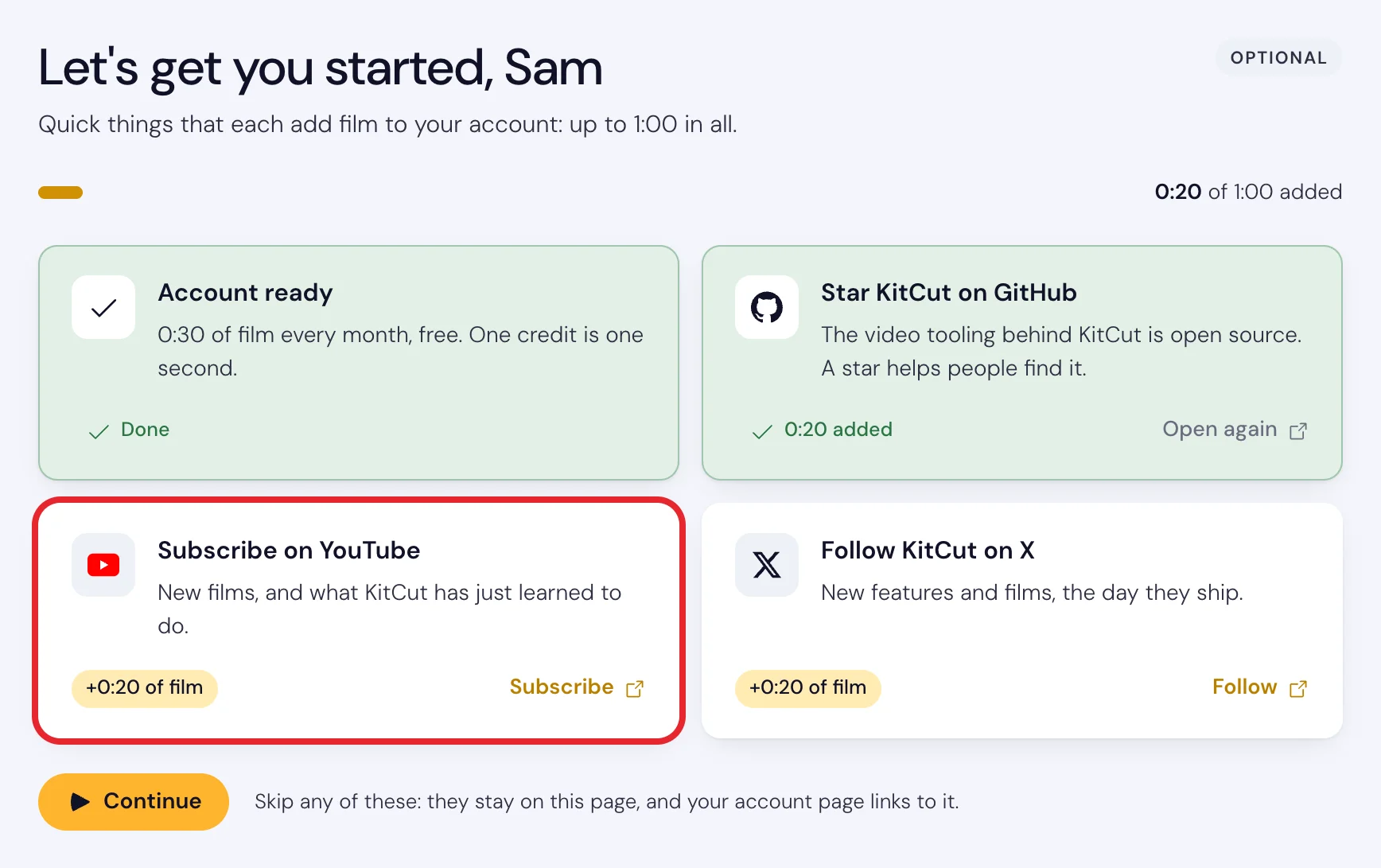
- How to get one: click its card. It opens in a new tab, and the credits arrive at once: the card turns green and the balance at the top goes up. KitCut does not check the star, the subscription or the follow.
- Once each per account. Opening a card again adds nothing.
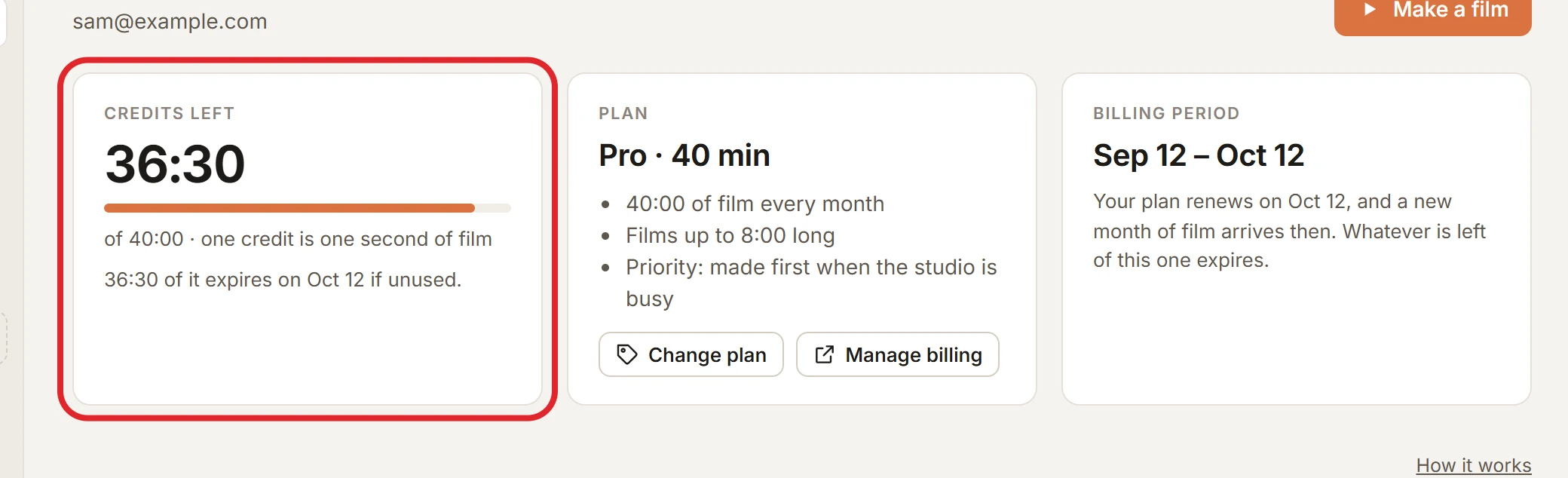
- Any account can get them, not only a new one: while one is left, the Credits left card on the account page links to the page.
- They last 365 days and are spent like any other credits, soonest-expiring first. The account page lists each under Credits received as a "Welcome bonus".
- Not on this page: signing up through a workspace invitation, an upload link or while connecting an assistant goes straight on; the bonuses are still at kitcut.ai/welcome.
- Once per person: a second account of someone who already has one gets no welcome bonuses and no monthly free credits (One account per person).
Free trial
- Every new account starts here: signing up goes on to the trial, and a card is needed to start it. There is no free film before the trial starts.
- The trial's page (one of two a new account may see; the other is the pricing page) is everything on one screen: what your first video is about (the idea you came with, or a box for it), the plan already chosen (Pro, 10 minutes a month; Change shows the other amounts right there), what you pay today ($0) and from when the month is charged, and the card itself, in Stripe's secure form inside the page, with Apple Pay or Google Pay where your device has it. If the bank declines the card, the page says why and asks for another in the same place. Once the card passes, your first video starts being made at once and the page takes you to it.
- Your first Pro plan starts with 7 days free, from the pricing page. A card is needed at checkout.
- What the trial gives: 2 minutes of film, whatever amount you chose (less if the amount is smaller), with everything else the plan has: its longest film, its frame rate, priority on Pro.
- Trial films carry the KitCut mark and the KitCut closing, as Free films do, until the first month is paid. Then every film made in the trial is drawn again without them, by itself, for no credits, and every film after is clean. A trial cancelled before its end leaves its films with the mark. The account page and the workspace's settings say so while the trial runs.
- When it ends, the plan's first month is charged to that card and its full minutes arrive. Whatever is left of the trial's film expires then.
- A reminder: we email you 2 days before the charge.
- To stop, press Cancel plan on the account page before the trial ends: nothing is charged, and you keep the trial until its end.
- Changing the amount during the trial changes what is charged when it ends; the trial's film stays 2 minutes.
- The card is checked with $1: when the trial starts, we ask the bank to hold $1 on the card and release it at once. Nothing is charged; some banks show a pending line for a moment. If the bank says no, or wants you to confirm the card first, the trial's film is there but films wait for another card: the account page says so, we email you, and Use another card there adds one. A card that passes carries the trial on as before. If no card passes within 48 hours (or before the trial would end, if that is sooner), the trial ends and nothing is ever charged.
- Once: one trial per workspace and per card. A workspace that has had a plan before, or a second account of somebody who has one, starts paid at once; a card that has had a trial on another account is charged at once.
- Not from Remove branding: the button on a film's page charges the first month at once, as it cleans the film at once.
Changing plans
- Moving up (a bigger plan or more minutes) applies at once. The difference is charged for the rest of the month, and the extra minutes are added in proportion.
- Moving down or cancelling takes effect at the end of the billing month. Credits already received stay until they expire.
- Changed your mind? A plan that is cancelled but has not ended yet shows Keep my plan on the account page: it renews as before.
- When a subscription ends, the account is on Free again, with a new free month from that day.
- A failed payment pauses new films until it is paid (films already being made finish). We email you, and the account page shows Use another card: add one and the payment is taken from it at once, and films are made again.
- Where to do it:
- change plans on the pricing page;
- cancel with Cancel plan on the account page (Stripe's page asks why, then cancels at the end of the month);
- update the card or see invoices under Manage billing on the account page (Stripe's billing portal); when a card has not gone through, Use another card there adds one and settles what is owed.
- People you invite into your workspace use your plan: every film in your projects uses your credits, whoever makes it, and your films at a time are shared by everyone in it. Only you choose and manage the plan. See Workspaces.
- Refunds: payments are not refunded, except where the law requires it.
Priority (Pro)
- When other films are waiting, Pro films are made first at every step that waits.
- Films on the same plan are served first come, first served.
- Priority doesn't make a film faster once its turn comes.
Two films at a time (Pro)
- A Pro account can have 2 films being made at the same time: start the next one while the first is being made, from the home page, a project or an assistant. Free makes 1 at a time.
- Past that, a new film is refused until one of them is finished or stopped. Nothing is taken for the refused film.
- Each film holds its own credits, and each is charged or given back on its own.
- Two at a time doesn't make either film faster, and both wait their turn when the service is busy (ahead of Free films, like every Pro film).
Inside AI assistants
Assistants connected to KitCut never show prices or plans, and never offer upgrades (Assistants). An assistant can report the balance and the longest film the plan allows.