 KitCut
Changing a finished film
A finished film can be changed without making a new one. The person who made it leaves notes on the film: this label is too small, this part is too fast, say this line differently. Claude then makes the film again with those changes, as the film's next version, and answers every note. The film keeps its page, its address and its views.
In short
- Open the film's page and press Change something.
- Point at what should change and say what you want: a spot or an area in the picture, a stretch of the film, a narration line, a moment, or the whole film.
- Press Make version 2. All the notes go at once. The page can be closed; an email says when the version is ready.
- Read Claude's replies. Each note says Done with what changed, or Not changed with the reason.
- Keep it or go back. The new version is the film for everyone. The version before is kept, and one click makes it the film again.
The first round of changes on a film uses no credits. After that, a round uses only the seconds its notes cover (What a round uses).
Who can change a film, and which films
- Who: the person who made the film, signed in. In a shared workspace, the workspace's owners and admins can too (Workspaces). Nobody else sees Change something, and a visitor's view of the film does not change.
- Which films: a finished film, on its own page (kitcut.ai/film/…). A film from the idea box, from a project or from a template can all be changed.
- Not offered:
- for a film that is still being made, or that failed;
- for KitCut's longest films, the ones made scene by scene: Change something does not appear on their pages yet;
- from an AI assistant: notes are left on the website (Assistants).
Leaving a note
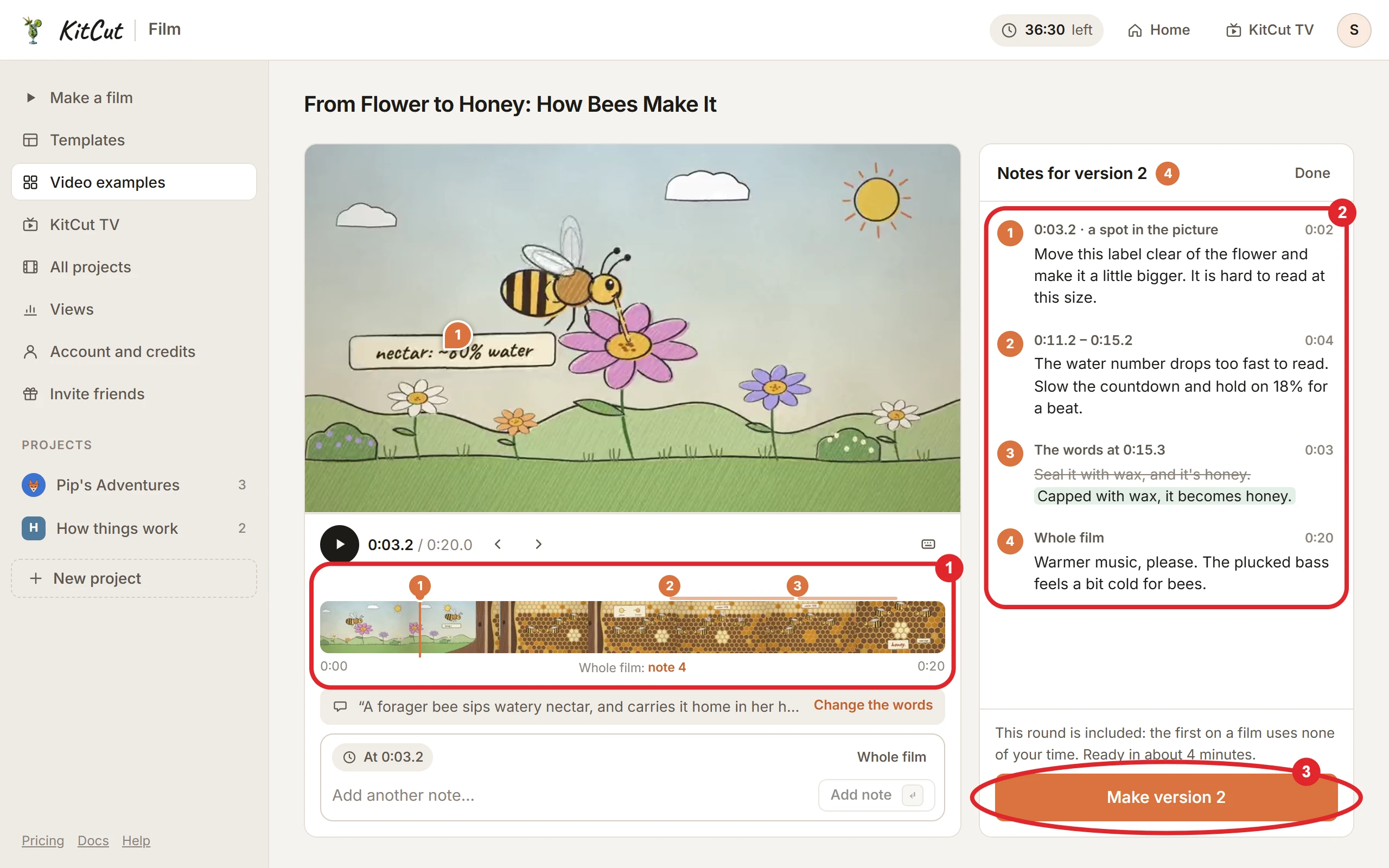
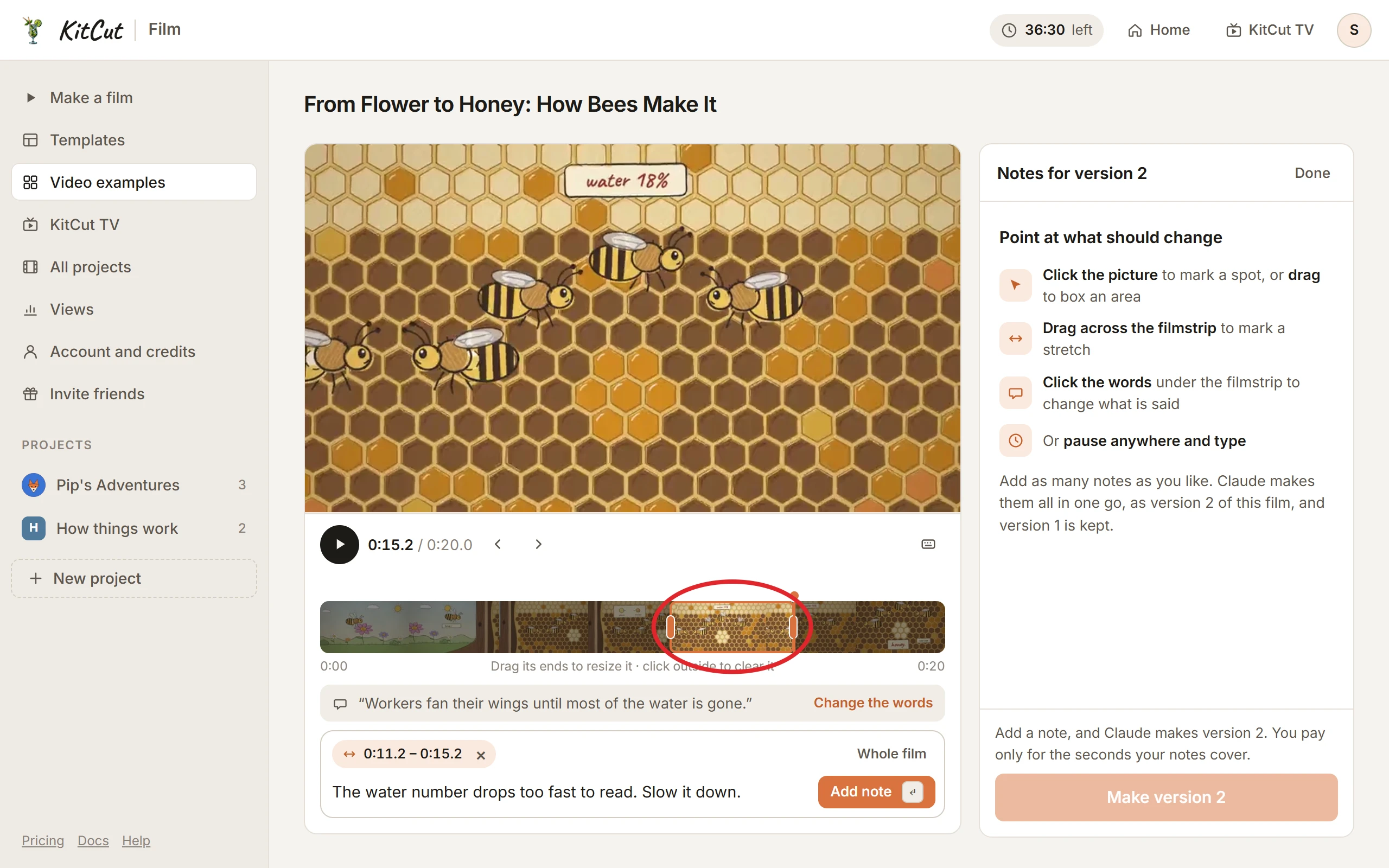
Change something opens the notes over the film: the film with its own play bar, a filmstrip of the whole film, the narration line being said at that moment, the note box, and the list of notes. A note has two parts: what it points at, and what should change there.
What a note can point at
| A note on | How to make it | It covers |
|---|---|---|
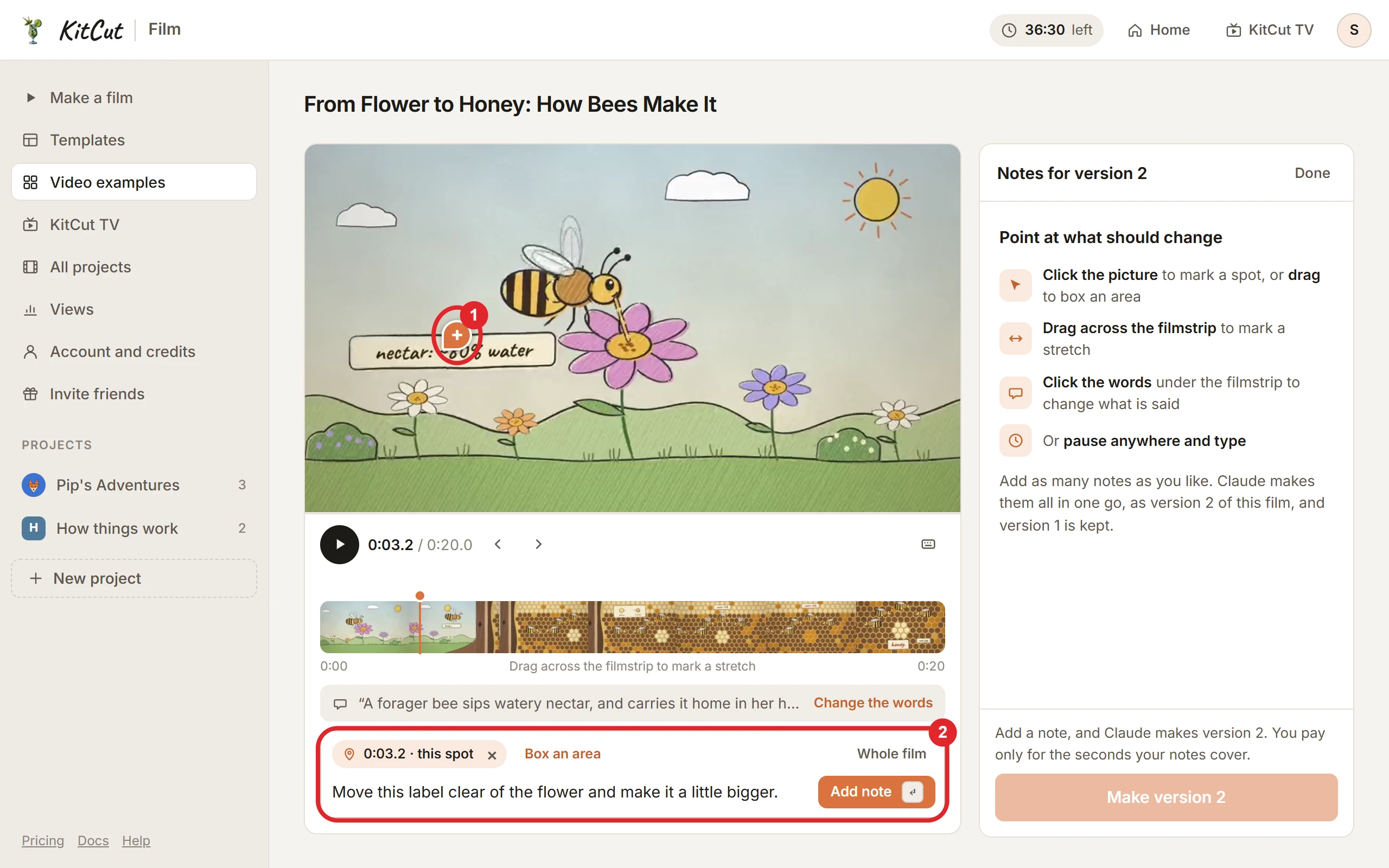
| A spot in the picture | Click the picture where the change should be. A pin lands there, at that moment of the film. | 2 seconds from that moment |
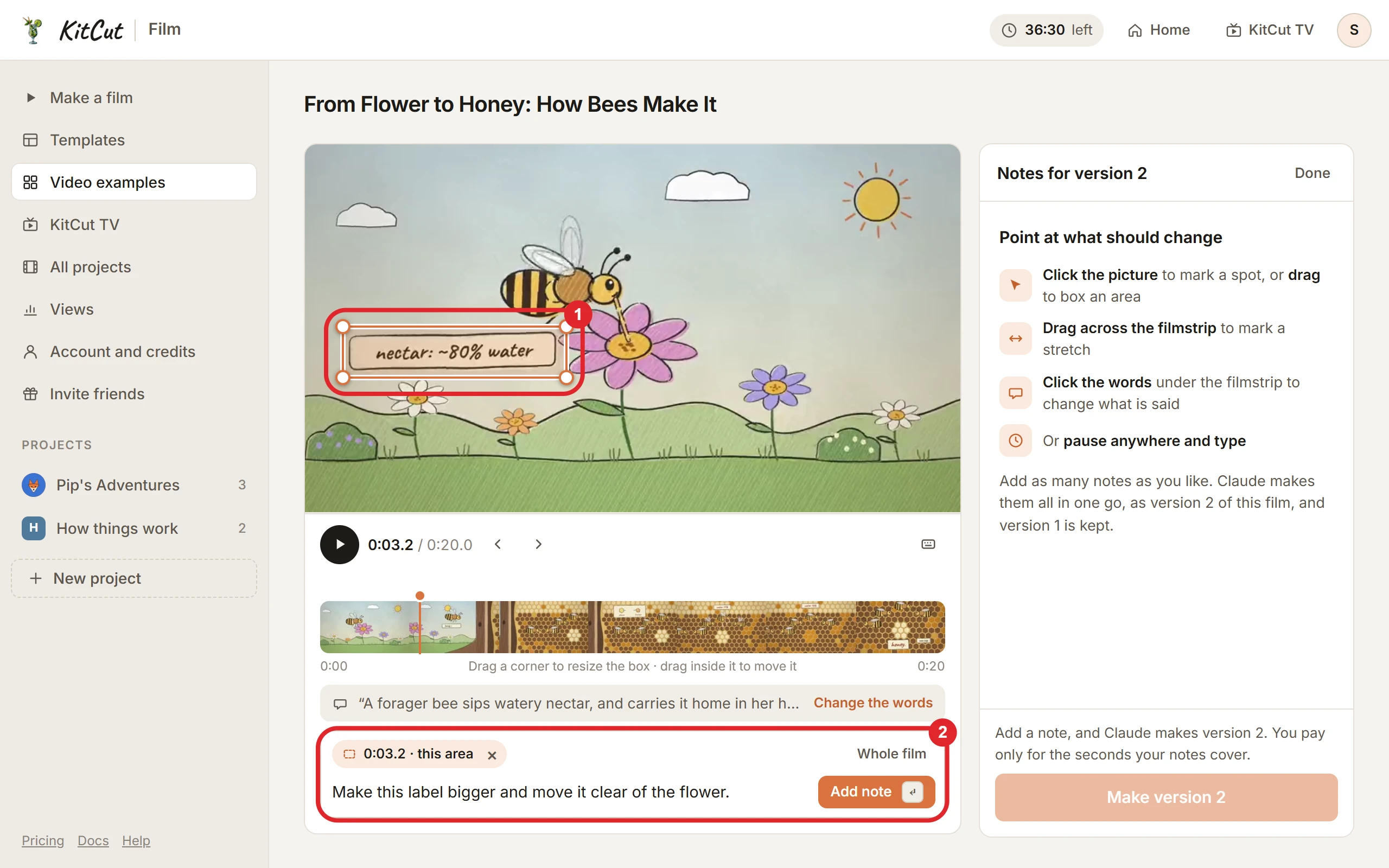
| An area of the picture | Drag a box around it on the picture. On a phone, tap the spot, then Box an area. | 2 seconds from that moment |
| A stretch of the film | Drag across the filmstrip, then drag either end to fit. | the stretch's length |
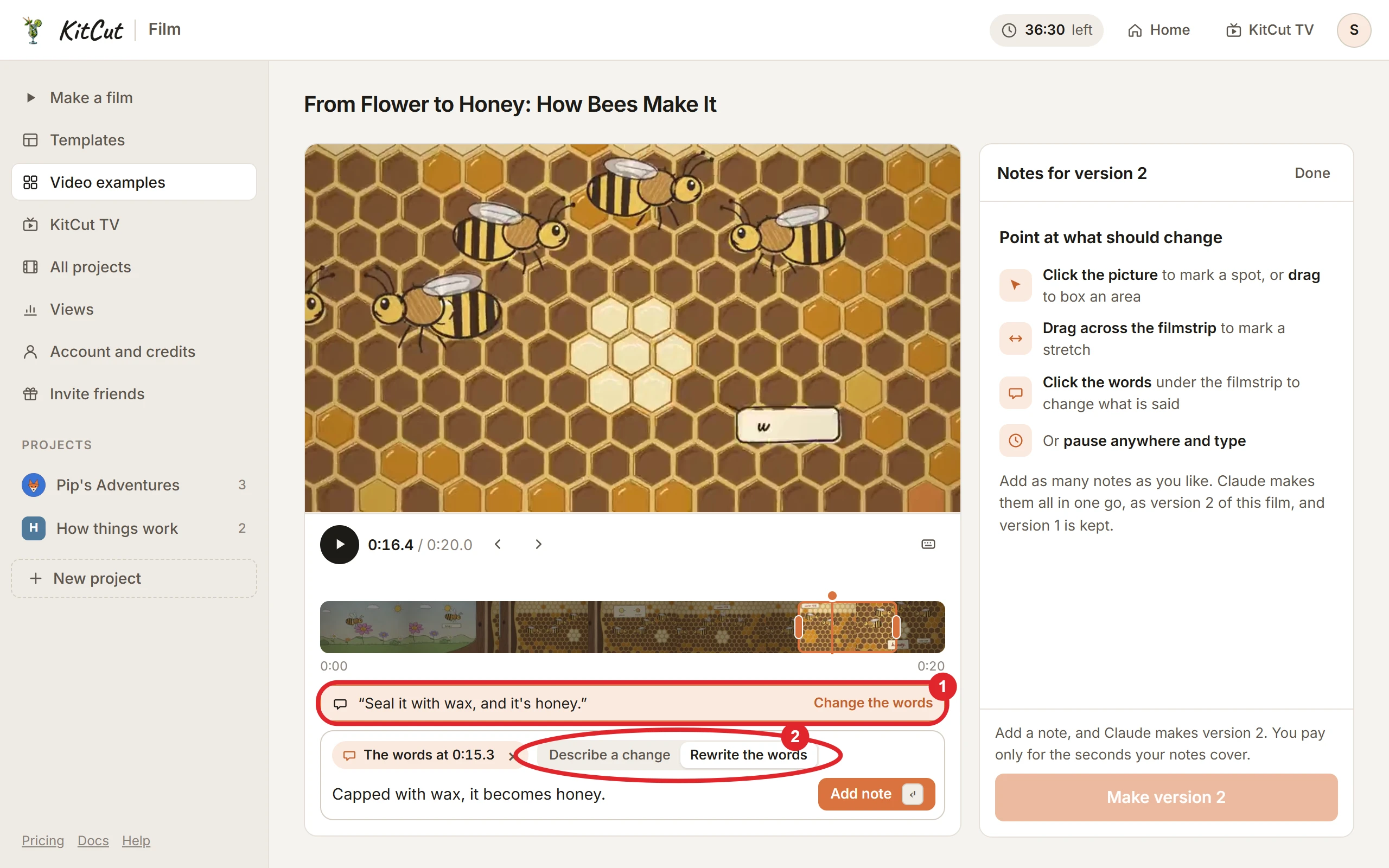
| The words | Click the narration line under the filmstrip (Change the words). | that line's length |
| A moment | Pause anywhere and type. | 2 seconds from that moment |
| The whole film | Choose Whole film in the note box. | the film's length |
- A spot is for one small thing on screen: a label, a face, a number. A click drops one pin on it. Claude is given the exact frame with the spot ringed on it, and the note's words say what should change there.
- An area is for something bigger, for a group of things, or for one of two things that sit close together. Drag a box around it; then drag a corner to resize the box, or drag inside it to move it. Box an area, beside a pin's chip in the note box, turns a pin into a box around it. Claude is given the exact frame with the box drawn on it.
- A stretch is for timing and motion: too fast, too slow, a pause that should be longer.
- The words can be changed two ways, chosen in the note box:
- Describe a change: say what should be different ("shorter", "mention the price").
- Rewrite the words: type the line as it should be said. The note shows the old line struck through and the new one under it.
- The line is recorded again in the same voice, and what happens on screen at those words moves with the new recording.
- A moment is for anything at that point of the film that is not one spot: the whole frame, the sound, the music there.
- The whole film is for what runs through it: the music, the pace, a colour used everywhere.
Writing, editing and removing notes
- Each note says what should change, in up to 500 characters. Add note (or Enter) adds it to the list.
- One version takes up to 20 notes.
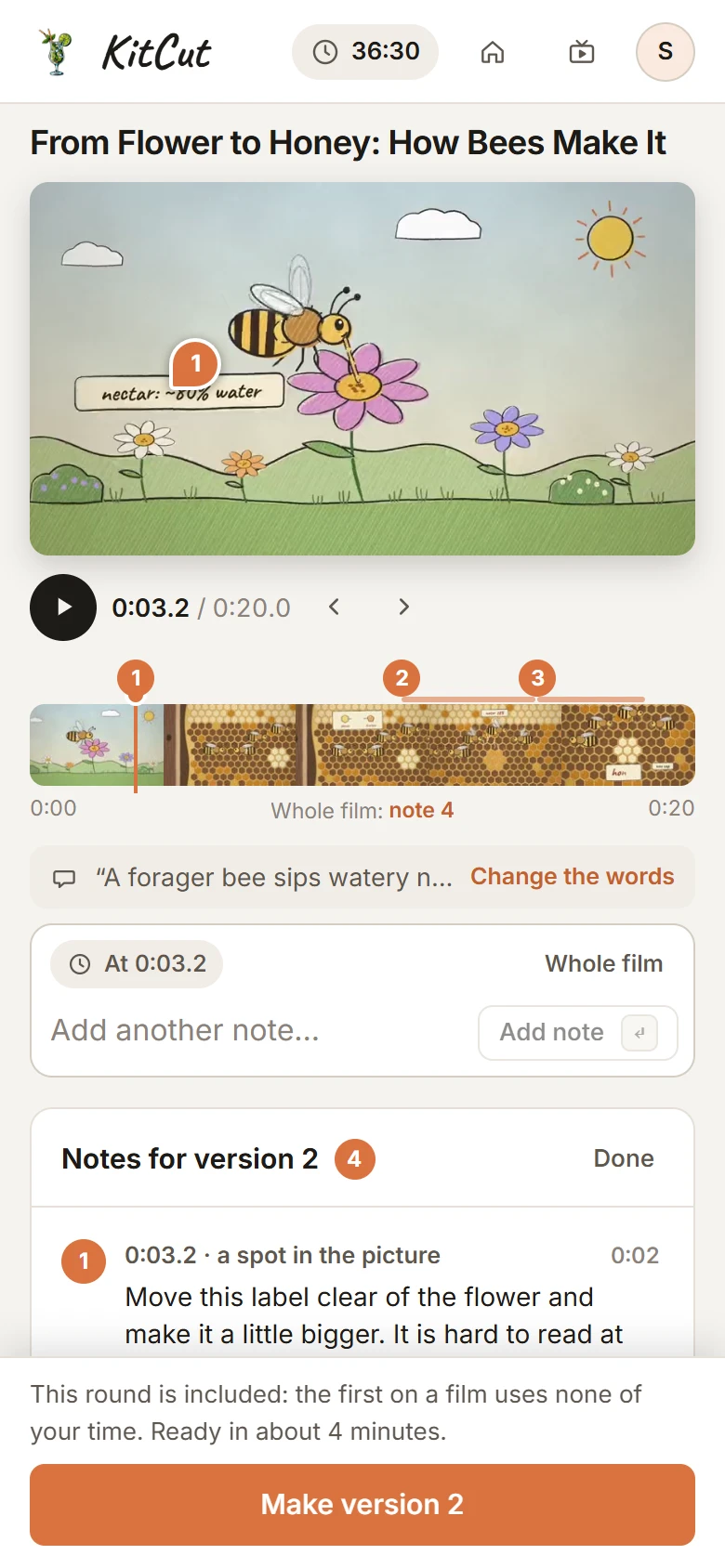
- Every note is numbered. Its number sits on the filmstrip at its moment, and on the picture when the film is at that moment; a boxed area shows its box there too. Clicking a note takes the film there.
- Edit or delete a note with the two buttons on it, until it is sent. A deleted note can be brought back with Undo for a few seconds.
- Notes are kept when the page is closed, and are there on any device you sign in on. A note that could not be saved says Not saved, with Try again.
- Say one thing per note, and say what you want to see. "Make the label bigger and move it off the flower" works better than "fix this".
Keys
| Key | What it does |
|---|---|
| Space | Play or pause |
| ← → | One frame back or forward |
| Shift + ← → | One second back or forward |
| C | A note at this moment |
| W | A note on the whole film |
| Enter | Add the note |
| Ctrl + Enter | Make the next version |
| B, held | Show the version before |
| Esc | Clear what is selected |
On a phone
The picture stays at the top of the screen while the filmstrip, the note box and the notes scroll under it, and the send button stays at the foot of the screen. Dragging the filmstrip moves through the film; Mark a stretch from here under it starts a stretch, and its ends can be dragged. A tap on the picture drops a pin; Box an area beside the pin's chip turns it into a box, adjusted by dragging its corners or the box itself (a finger dragged across the picture scrolls the page, so a box is not drawn that way on a phone).
Sending the notes
Make version 2 (then 3, and so on) sends all the notes at once, and Claude makes them in one go. One press is one round of changes.
- Before you press it, the page says what the round uses and how long it should take.
- How long it takes: a version of a short film is usually ready in about 3 minutes. The whole film is drawn again, so a longer film takes longer: about 7 minutes for a one-minute film, about 39 minutes for an 8-minute one.
- What Claude changes: only what the notes ask for. Everything not mentioned stays: the scenes, the timing, the words and the music.
- What stays fixed whatever the notes say: the film's length, its look, and how many narration lines it has (a line can be said differently; lines are not added or removed).
While the version is being made
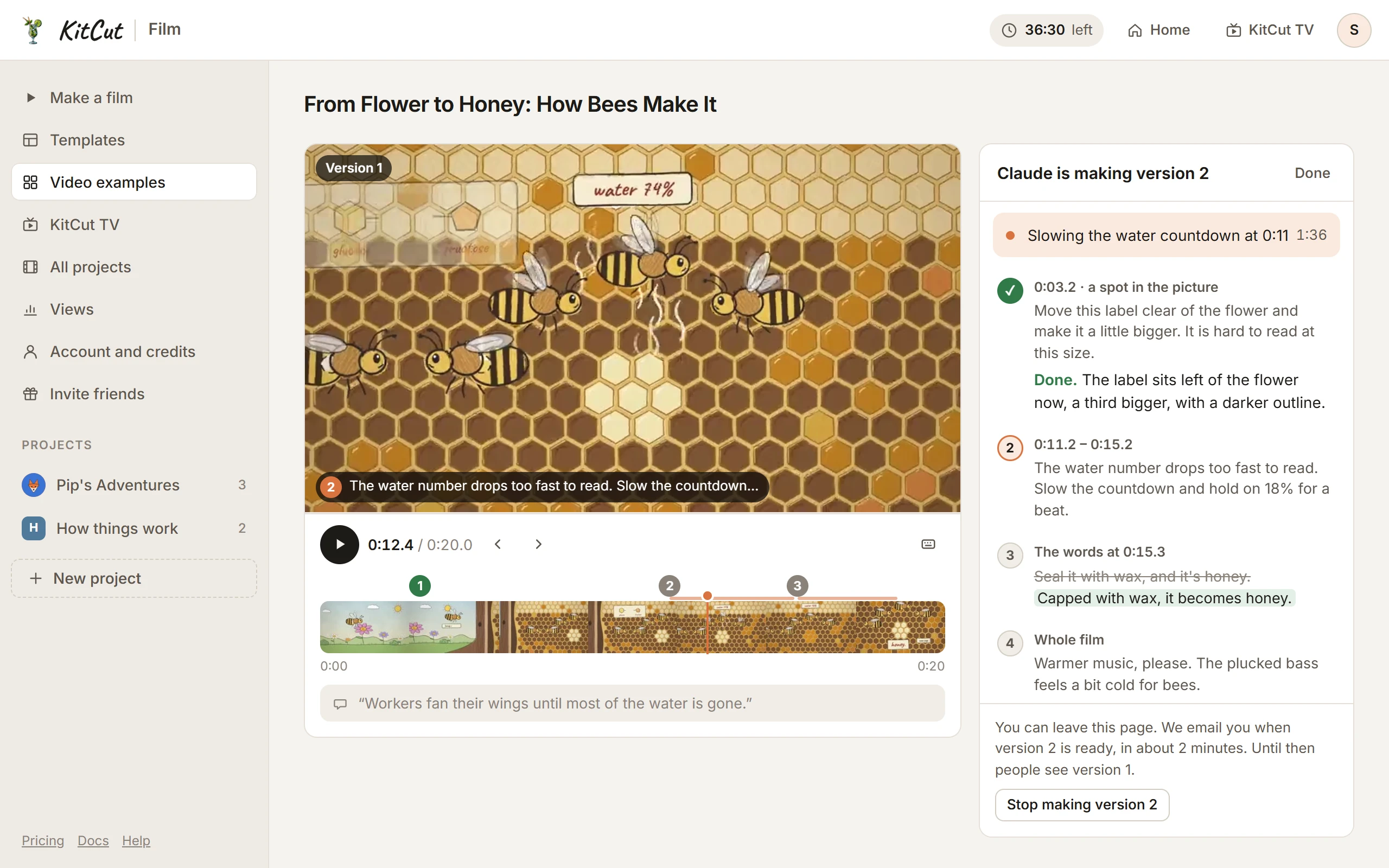
- The page says where it stands:
- "Version N is waiting its turn" when the studio is busy, with how many films are ahead. Nothing is being made yet.
- "Claude is making version N", with what Claude is doing now and a clock. Each note is marked as it is dealt with.
- "This is taking longer than usual" when it is well past the usual time. It is still being made.
- The page can be closed. An email says when the version is ready (Emails).
- Until it is ready, people see the version before. Nothing about the film changes for them.
- Stop making version N stops it. Nothing is used, the film is as it was, and the notes are back in the list to change and send again.
- Meanwhile: no notes can be added, and the film can't be published to YouTube; Publish to YouTube on the film's page is off and says why. The film's page shows "Claude is making version N" beside its status, and the film is marked the same way in your lists (the account page and its project's page).
When the version is ready
The new version is the film: its video, its download, its poster, its link preview and its subtitles.
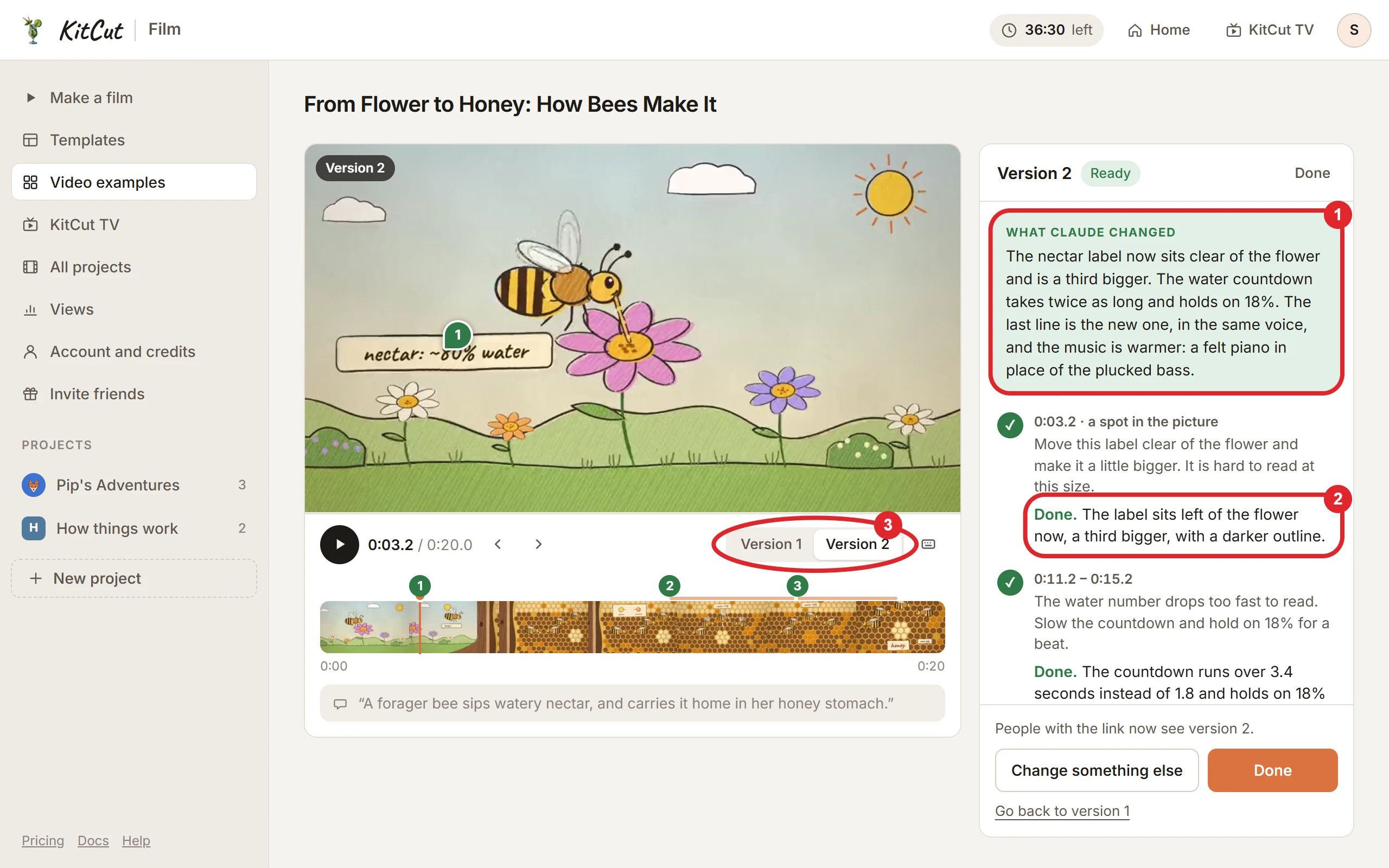
- What Claude changed: one paragraph, in plain words, of what is different in this version.
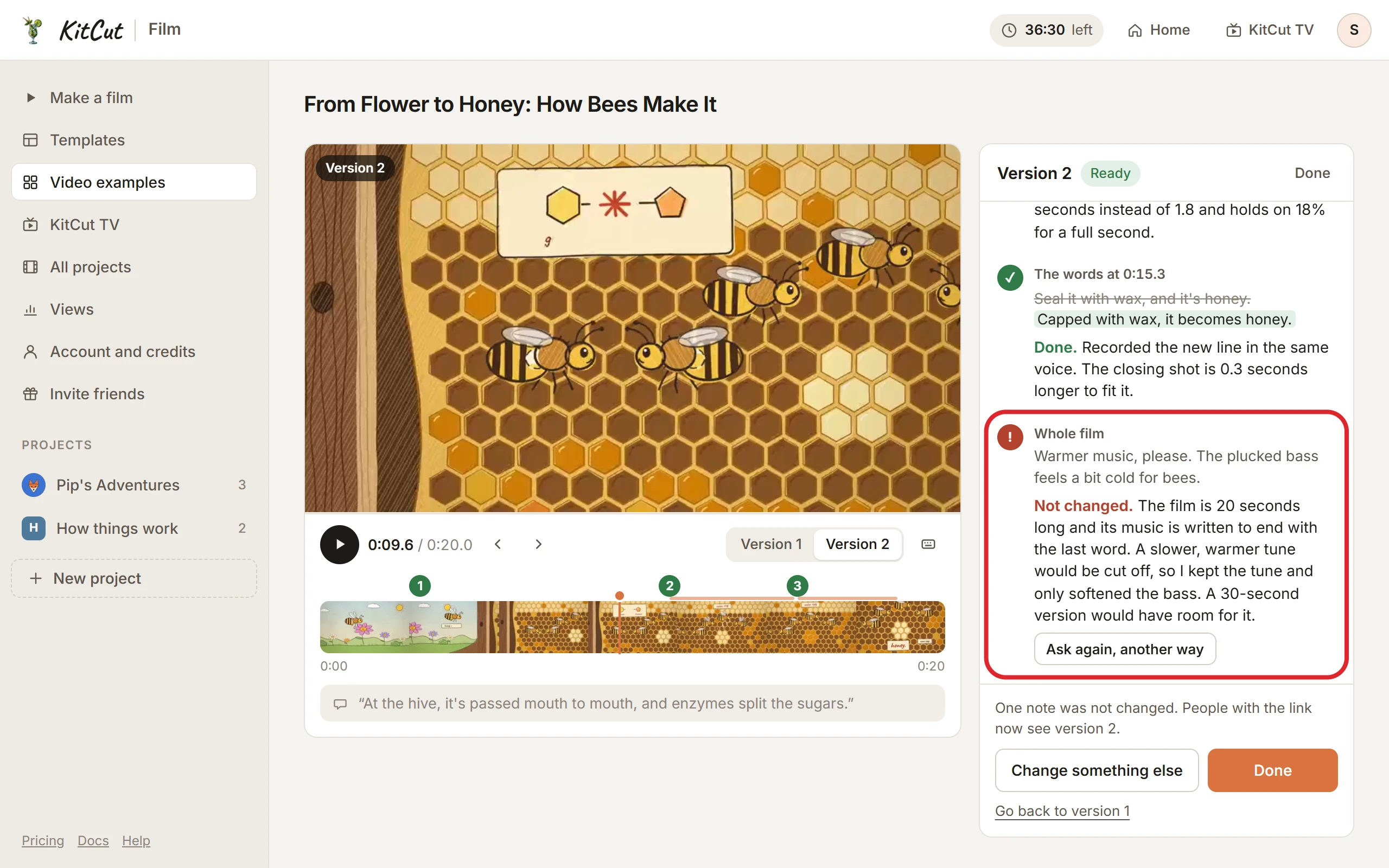
- A reply under every note:
- Done, with one sentence saying what changed.
- Not changed, with the reason and what would make it possible. Ask again, another way puts that note back in the box to reword.
- Compare the versions: the switch under the picture shows each kept version at the same moment of the film. Holding B shows the version before for as long as it is held.
- Change something else starts the notes for the next version. Done closes the notes.
- Where the new version shows: on the film's page at once, and on its share page within the hour.
A version that is not made
- It failed, or the studio restarted: "Version N did not finish."
- Claude found nothing it could change: "Version N was not made," with its reason.
- In each case nothing is used, the film is exactly as it was, the notes are there to change and send again, and an email says so.
Versions, and going back
- A film's page says which version it shows once there is more than one ("Version 2 of 3"). Clicking it opens the notes.
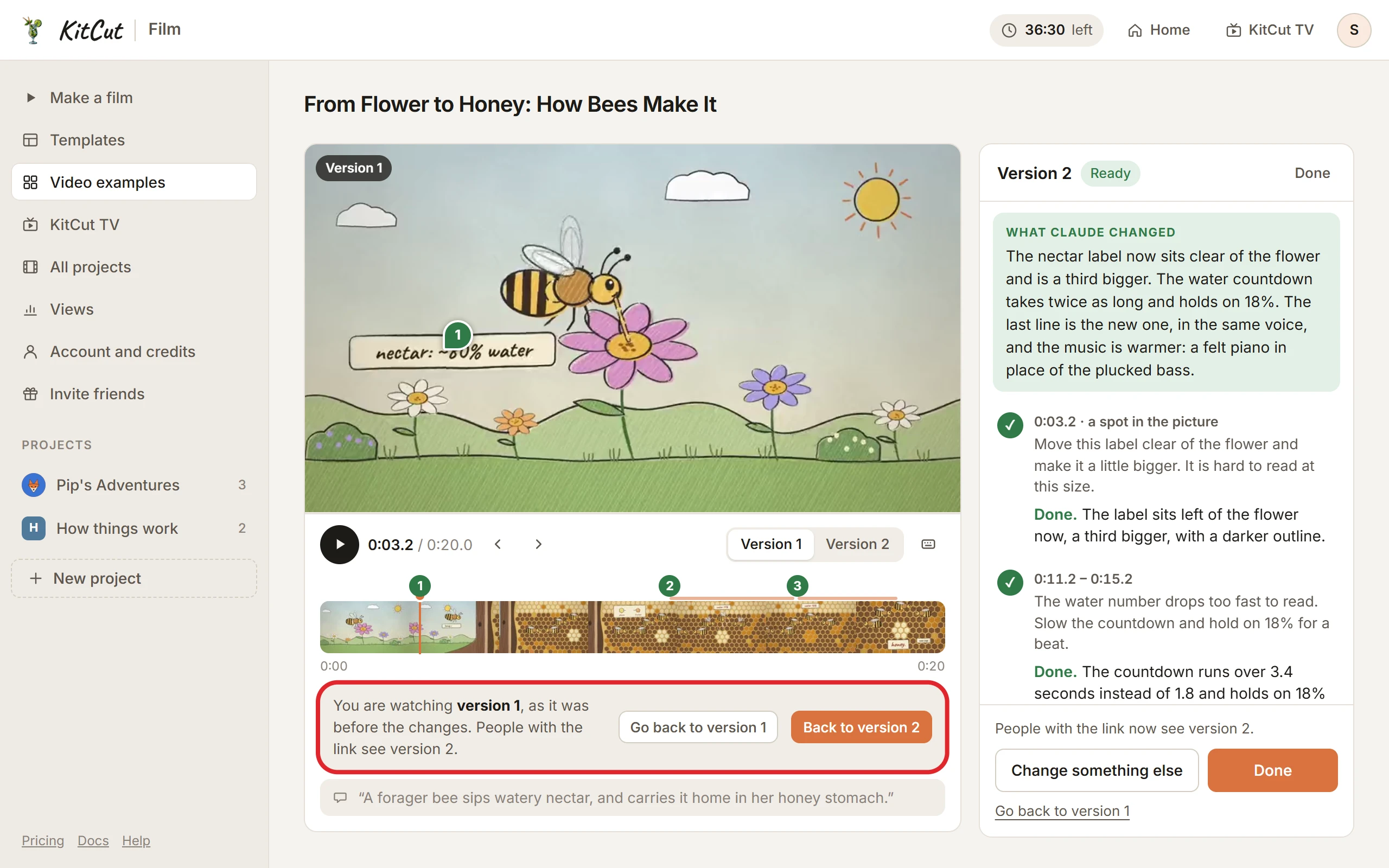
- The last 3 versions are kept. The switch under the picture plays each of them.
- Watching an older version shows a bar over the notes: "You are watching version 1. People with the link see version 2."
- Go back to version N makes that version the film again, for everyone: its video, its download, its poster and its subtitles. Nothing is made again and nothing is used. The later version stays kept, and can be gone back to in turn.
- The next round always makes a new version, numbered one past the highest there is, from the version the film shows.
- A version that is no longer kept can't be gone back to.
What a round uses
One round is one press of Make version N: all the notes sent together.
- The first round on a film is included. It uses no credits.
- After that, a round uses the seconds its notes cover, one credit a second (What a note can point at):
- a stretch or a narration line covers its own length;
- a spot, a boxed area or a moment covers 2 seconds from it, whatever the box's size;
- a note on the whole film covers the film's length;
- seconds covered by more than one note count once.
- At least 5 credits, and never more than the film's length. A 12-second stretch uses 12 credits, one spot uses 5, and a note on a whole 45-second film uses 45.
- Each note shows the seconds it covers, and the page shows what the round uses before it is sent. When the balance is too small the button is off, with a link to get more.
- Held, then charged, like a film's credits: held when the notes are sent, charged when the version is made, and given back when it is not made or is stopped. A round that is given back does not count as the film's first.
- Going back to an earlier version uses nothing.
- A film in a shared workspace uses the workspace's credits, whoever sends the notes (Workspaces).
Credits themselves are on Plans and credits.
Emails
- "Version N of your film is ready," with what Claude changed and a link that opens the film's notes.
- A version that did not finish, or was not made, gets an email saying so: nothing was used, and the notes are there to send again.
- A version you stop yourself sends none.
- A link opened where you are not signed in asks you to sign in first, then opens the notes.
- They follow the same switch as "Your film is ready" (Your account).
A film that is on YouTube
- A copy on YouTube stays as it was. YouTube does not let a video's picture be replaced.
- The notes say so: "YouTube still has version 1. Publish version 2 from the film's page."
- Publish the film again for the new version (Publishing to YouTube). A film is published as the version it shows at that moment.
Limits
| What | What happens |
|---|---|
| 20 notes on one version | The note box says that is the most for one version; send them, then add more to the next. |
| A note longer than 500 characters | The note box counts down, then shows how many characters to cut. |
| 5 rounds of changes to one film in a day | The notes are kept, to send the next day. |
| A second round while one is being made | One version at a time: the notes open again when it is ready. |
| A film going up to YouTube, or having its KitCut branding removed | The notes wait until that is done, a few minutes. |
| A film told in your own ElevenLabs voice (Narrator voices) | Its words can't be rewritten yet; the words button says so. Its picture, timing and music can be changed. |
| Too few credits for the round | The button is off and the price is in red, with a link to get more. The notes are kept. |
Not possible yet
- Editing by hand. There is no timeline, no cutting and no replacing a picture or a sound yourself: a note says what should change, and Claude changes it.
- Freehand drawing on the picture. A note marks a spot with a pin or an area with a box. Circling by hand, arrows and writing on the frame are not possible.
- Changing the film's length or its look with a note. Make the film again for that (Make it again, a new film).
- Adding or removing narration lines. A line can be said differently.
- Rewriting the words of a film told in your own ElevenLabs voice.
- Changing KitCut's longest films, the ones made scene by scene.
- Notes from someone else: a client or a colleague who is not the film's maker (or its workspace's owner or admin) can't leave notes.
- Notes from an AI assistant. An assistant can make a film again with its idea changed (
remake_film), which is a new film (Assistants). - Notes while a film is still being made.
- Replacing a video already on YouTube.