 KitCut
Assistants (MCP)
KitCut is an MCP server at https://kitcut.ai/mcp, so an AI assistant can make films from a chat. The person signs in to KitCut once. The assistant can then:
- start films, follow them, and make them again; line up several, which start one after another by themselves;
- pass pictures, text files and voice notes;
- bring back characters, and put a project's cast in an episode by
@name; - run projects: start one, write its brief, give it pictures, keep drafts and voice lines, and make its episodes;
- write a finished film's YouTube title, description and thumbnails, publish it to a connected channel, and follow it until it is live;
- work across every connected channel at once: publish or schedule a film on several, and read their calendars and numbers side by side;
- read YouTube's own numbers for a channel or a video, read one video in full, and change a published video's words, thumbnail or who can watch it;
- schedule films, even while they are being made, one at a time or every finished episode of a project by itself;
- say how the films are doing, and gather everything to plan the next videos from;
- report the credit balance.
Films made this way are the same films, with the same credits and limits, as on the website (Making a film).
An assistant does only what the person can do with their own account on the website. No tool reaches another account, and no tool can do something the site does not let the person do.
| What a person does | On the website | From an assistant |
|---|---|---|
| Make a film from an idea, pictures, text files and voice notes | the home page | make_film, open_film_maker |
| Follow a film being made; watch, download and share it when it is done | the film page | get_film |
| See the films made, where each stands and how many views it has | the account page, the Studio | list_my_films |
| Stop a film being made | the film page | stop_film |
| See every film being made at once (its stage, its place in the studio's line, the time it has left) and the films waiting in the account's line; take one out of the line | the account page and the Studio list the films being made, each film's page says where it stands; the page makes one film at a time (two on Pro) and starts the next when asked, where an assistant's films wait in a line and start by themselves | get_queue, unqueue_film |
| Make a film again, as it was or with the idea, length or look changed | the film page and the Studio ("Try again", "Edit idea") | remake_film |
| Make a finished film in other languages: the same scenes, pictures, music and narrator's voice, with the narration and the words on screen translated, each a film of its own | the film page ("Translate") | localize_film |
| Make a film public or link-only | the account page | set_film_public |
| Browse the public films | the home page | browse_films |
| See the templates; make a film from one with a few words about what it is for, and pictures if there are any (make_film with template) | the Templates pages | list_templates, get_template |
| Add pictures, text files and voice notes for the next film | the home page, the Studio, the upload page | get_upload_link, list_uploads |
| See and forget the recurring characters | the Studio | list_characters, forget_character |
| See the credit left, the longest film and when credits renew | the account page | get_credits |
| See the projects and open one: settings, brief, pictures, characters, voice lines, drafts, episodes | the Studio | list_projects, get_project |
| Start a project | the Studio | create_project |
| Change a project's name, brief, look, length, channel or mark, and have its finished episodes published by themselves; archive it or bring it back | the Studio (a project's Settings) | update_project |
| Keep episode ideas as drafts, and delete them | the Studio (Drafts) | save_draft, delete_draft |
| Give a project's episodes pictures, and take them away | the Studio (a project's Pictures) | add_project_picture, remove_project_picture |
| Keep an episode's narration line for the next episodes, and drop one | the Studio (a project's Voice) | list_episode_lines, keep_voice_line, drop_voice_line |
| See the connected channels | the account page | list_youtube_channels |
| See a connected channel's totals and its latest or most viewed videos with their numbers | the publish dialog reads them to write in the channel's voice; YouTube Studio shows the same numbers | list_channel_videos |
| See one video in full: its words, who can watch it, YouTube's numbers and the film behind it | a video's page in the Studio (Details, Views) | get_youtube_video |
| Change a published video's title, description and tags, or who can watch it | a video's page in the Studio (Details, who can watch) | update_youtube_video |
| Pick a video's thumbnail: one of the four made from the film, or a picture of one's own | the publish dialog and a film's page in the Studio (Thumbnail, Upload your own) | set_youtube_thumbnail |
| See YouTube's own numbers for a connected channel or one of its videos: views, watch time, subscribers, the most watched videos, where the views came from and the YouTube search terms that brought them | the Views page shows them for the videos KitCut published; YouTube Studio's Analytics for the whole channel | get_youtube_views |
| Have the title, description, tags and four thumbnails written from a film | the film page (Publish to YouTube) | draft_youtube_post |
| Publish a finished film to one or more connected channels, and follow it until it is live | the film page (Publish to YouTube) | publish_to_youtube, get_youtube_post |
| See the channels' calendars, one or all at once: what each published, what is scheduled or planned, the pace it keeps and the next free day | the film page (Publish to YouTube, Scheduled) | get_youtube_schedule |
| Move a scheduled video to another day and time | the film page (Publish to YouTube, Scheduled: Move) | move_youtube_schedule |
| Schedule a film on one or more channels for a day and time, even while it is still being made (it goes up the minute it is finished), and take it off again | the publish dialog (Schedule) for a finished film; a project's Settings (Publish new episodes automatically) for every episode as it is finished | schedule_film, unschedule_film |
| See how the films are doing: YouTube's numbers and KitCut's views, for the account, a project or a film | the Views page, and a project's Views tab | get_views |
| Gather a project's brief, episodes and their numbers, drafts, and its channel's best videos and calendar, to think up the next videos | the Studio (a project's page, its Drafts and Views), and the publish dialog's calendar | brainstorm_videos |
| Read how a research film is made: the topic, the research, the three documents a film is made from, the checks, the film and publishing | the docs (Research films) | get_playbook |
| Check a research film's fact sheet, chart data and script against each other, and read each fact again on its page, before making it | an assistant's own step before make_film: the website makes a film from the documents it is given (the home page's text files) and checks the narration against a word-for-word script as the film is made | check_research, check_sources |
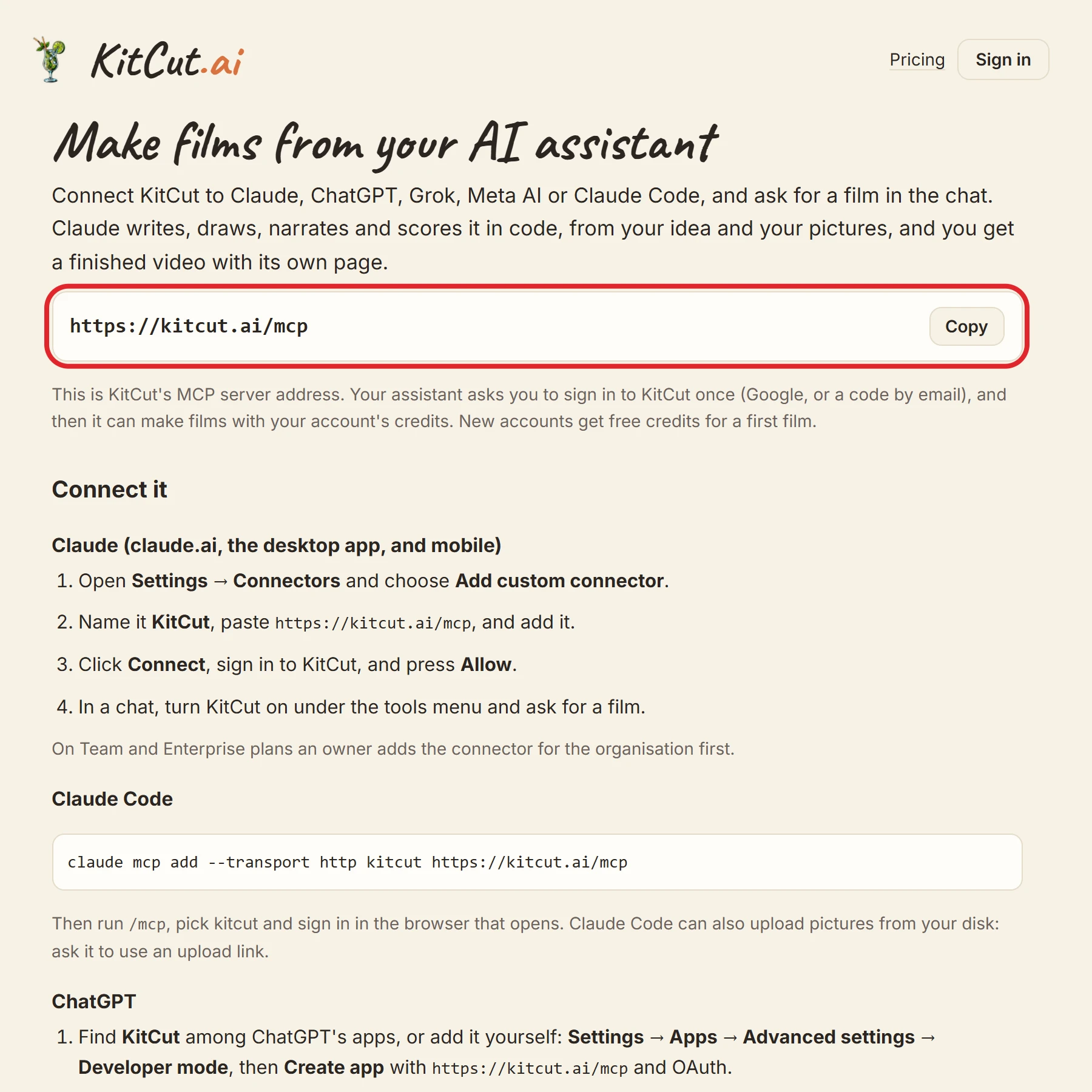
Connecting
Using it to run a faceless YouTube channel, with episodes researched, made and scheduled on a timer: A faceless YouTube channel, run from your AI assistant.
| App | How |
|---|---|
| Claude (web, desktop, mobile) | Customize → Connectors → + Add → Add custom connector. Name it KitCut, paste https://kitcut.ai/mcp, press Continue, sign in, press Allow. On Team and Enterprise plans an owner adds it first. |
| Claude Code | claude mcp add --transport http kitcut https://kitcut.ai/mcp, then /mcp, pick kitcut and sign in. |
| ChatGPT | Settings → Apps → Advanced settings → Developer mode → Create app with https://kitcut.ai/mcp and OAuth; sign in and press Allow. |
| Grok | grok.com → Connectors → New connector → Custom; paste the address, choose OAuth, sign in. |
| Meta AI and other MCP clients | Any client that connects to remote MCP servers with OAuth: add the address and sign in. |
Sign-in and connection
- Transport: Streamable HTTP. Every request needs a token, including listing the tools.
- Sign-in: OAuth 2.1 with PKCE (S256), and one scope,
films.- The person signs in on KitCut's own page (Google, or a 6-digit code by email) and presses Allow. The assistant never sees the sign-in.
- Apps register with a Client ID Metadata Document or by Dynamic Client Registration.
- Tokens:
- An access token lasts 1 hour.
- A refresh token lasts 30 days from its last use and is replaced every time it is used.
- Reusing an old refresh token disconnects the app.
- Disconnecting: on the account page under "Connected assistants". The app's tokens stop working at once.
- What KitCut receives: only what the assistant sends on the person's behalf: the idea, the length and look, and pictures, text files or voice notes. It never receives the conversation.
The tools
| Tool | What it does | Inputs |
|---|---|---|
make_film |
Start an animated film from an idea. Returns at once with the film's id and link; the film takes about 8-30 minutes to make, longer for films past a minute (the answer gives an estimate), so follow it with get_film. Uses credits: one per second of film, at least 30, and more with quality standard or high (a collage, or a GPT Image project). Add pictures by public https link (picture_urls), as files attached in ChatGPT (pictures), or by upload_ids (from open_film_maker or get_upload_link), and say with picture_roles what each is for: shown as it is, what a real place has, or how to draw one kind of thing. With people (a photo of each), those people are in the film as drawn characters who talk in their own voices, in character_style; ask the person first whether they have permission to use the photos. With project, it is an episode of that project: it reads the project's brief and gets its pictures, characters and voice lines, and the length and look default to the project's. With a draft (save_draft), the draft is made and leaves the drafts. With youtube, it is scheduled on the person's YouTube channels at once and goes up the minute it is finished. While the account is making all the films it may at once, the new one waits in the account's line and starts by itself (queue; get_queue shows the line). The film is link-only unless public is true. | idea (string, up to 12,000 characters); seconds (number, 5 to 1800, in steps of 5); look (string, one of "drawn", "painted", "collage"); picture_urls (list, at most 32); voice_note_urls (list, at most 3); pictures (list, at most 32); upload_ids (list, at most 38); picture_roles (list, at most 9); documents (list, at most 3); people (list, at most 4); character_style (string, one of "auto", "crayon", "papercut", "newspaper", "woodcut", "watercolour", "popart", "courtroom", "chalk", "sticker", "felt", "knit", "peg", "sock"); people_consent (boolean); project (string, up to 200 characters); draft (string); public (boolean, default false); template (string, up to 80 characters); quality (string, one of "draft", "standard", "high"); frame (string, one of "16:9", "1:1", "9:16"); queue (boolean, default true); youtube (object) |
get_film |
Where one of the person's films stands: waiting, being made (and what Claude is doing), done (with the film's link, its share page, its MP4, its views and where it is on YouTube), or not finished (why, its whole idea, and whether its credits came back). wait_seconds (up to 50) waits for news before answering. | id (string, required); wait_seconds (number, 0 to 50, default 0) |
list_my_films |
The person's latest films, newest first: idea, look, length, status, link and share page, views, whether it is public, and how its credits ended. status narrows it to the films being made (making), done, or not finished; project to one project's episodes. | limit (number, 1 to 50, default 10); status (string, one of "making", "done", "not_finished"); project (string, up to 200 characters) |
stop_film |
Stop one of the person's films while it is waiting or being made. Its credits come back. It cannot be resumed. | id (string, required) |
remake_film |
Make one of the person's films again, as a new film: its whole idea, its look and length, its frame (a Short stays a Short) and its project, as the Studio's "Try again" does, with any of them changed. For a film that did not finish, or another take of one that did. The pictures, text files and voice notes the first film was given are not kept: pass them again (picture_urls, upload_ids) when it needs them; a project's own pictures come by themselves. Uses credits like any film; the first film stays as it is. | id (string, required); idea (string, up to 12,000 characters); seconds (number, 5 to 1800, in steps of 5); look (string, one of "drawn", "painted", "collage"); picture_urls (list, at most 6); upload_ids (list, at most 15); picture_roles (list, at most 9); quality (string, one of "draft", "standard", "high"); public (boolean, default false) |
localize_film |
Make one of the person's finished films in other languages: for each language, a new film with the same scenes, pictures, characters, music, sound and narrator's voice, its narration and every word on screen translated, the narration recorded again in that voice and the scenes timed to it. Nothing else changes; each is a film of its own with its own link and title, so it can go on a channel in that language. Always made from the original film (named by its id, or by one of its translations). Languages: English (en), Spanish (es), French (fr), German (de), Italian (it), Portuguese (pt), Ukrainian (uk), Polish (pl), Dutch (nl), Swedish (sv), Danish (da), Norwegian (no), Finnish (fi), Czech (cs), Romanian (ro), Hungarian (hu), Turkish (tr), Indonesian (id), Bulgarian (bg); never the film's own, and one film per language. Each uses half the original's credits (rounded up), whatever length the translation comes out at; the credits come back if it does not finish. Not for a film told in the person's own ElevenLabs voice, or while its next version is being made. Takes about as long as a film of that length. The ones the account has no room for now wait in its line and start by themselves (get_queue). Link-only unless public is true. With youtube, each is also put on a YouTube channel as it is made: its title, description and thumbnails are written fresh for it in its own language, not the original's. get_film lists a film's languages. | id (string, required); languages (list, at most 12, required); public (boolean, default false); queue (boolean, default true); youtube (object) |
set_film_public |
public true: one of the person's finished films may appear in the public KitCut gallery and in search. public false: link-only again (anyone with the link can still watch it). | id (string, required); public (boolean, required) |
get_credits |
The person's KitCut credit: seconds of film left, the longest film their plan makes, and when credits renew; then the same for each other workspace they make films in, whose projects' episodes it pays for. One credit is one second; every film uses at least 30. | none |
get_upload_link |
A link the person opens on any device (phone or computer) to add pictures, text files (.txt, .md) and voice notes for their next film, plus a put_url an agent with a shell can upload files to (curl -T file put_url). Then list_uploads gives their upload ids for make_film. Uploads keep for a day. | none |
list_uploads |
Pictures, text files and voice notes the person added in the last day that no film has used yet: their ids (for make_film upload_ids), kind, size, a text file's name and a voice note's words. | none |
list_characters |
The characters the person's earlier films made, kept for a series: name, what they are, whether each is drawn (code the films draw it with) or painted (a project's painted character: a picture its episodes are painted from, added on the project's Cast tab or kept by a painted episode), and how many films they were in. Name one in make_film's idea to bring them back. With project: the characters that project's episodes keep; in an episode's idea, @name (exactly as listed) puts that character in the film as the cast has them, and an @name close to one but not it (@mum for mom) is refused with "did you mean @mom?": fix it and call make_film again. | project (string, up to 200 characters) |
forget_character |
Leave one recurring character out of the person's next films (with project: out of that project's next episodes, e.g. a logo or emblem an episode invented). Films already made keep it. | name (string, required); project (string, up to 200 characters) |
browse_films |
Recent public films made with KitCut, for ideas: what each was asked for, its look and length, its link and its MP4. | limit (number, 1 to 12, default 6) |
list_templates |
Templates: finished films a person can have remade as their own from a few words (what the film is for) and, if they have them, pictures. Each with its slug, length, sound, frames, the credits it uses and how many films were made from it. get_template tells how to use one; make_film with template makes one. | category (string, up to 40 characters) |
get_template |
One template: what its film is, an example of what to ask for, how many pictures it takes, and how to make a film from it with make_film. | template (string, up to 200 characters, required) |
open_film_maker |
Show the KitCut film maker in the chat: the person types or edits the idea, drops in pictures, picks the length and look, and starts the film there. Use it when they want to add pictures from their device. Hosts without a film player: use get_upload_link instead. | idea (string, up to 12,000 characters); seconds (number, 5 to 1800, in steps of 5); look (string, one of "drawn", "painted", "collage"); project (string, up to 200 characters) |
film_progress (the in-chat film maker only) |
The film player's own poll: a film's status and its new events since a point. | id (string, required); since (number, 0 to 9007199254740991, default 0) |
start_upload (the in-chat film maker only) |
The film player's own upload address for pictures the person drops in. | none |
get_queue |
Every film the person has in the making right now, in one answer: each one's stage, what the studio is doing, its place in the studio's line when it waits for its turn there, how long it has been going and roughly how long it has left; then the films waiting in the account's own line (make_film puts a film there while the account is making all it may at once), in the order they start, each with roughly when; and the films lately started from that line, or that could not start and why. wait_seconds (up to 50) waits for something to move on. | wait_seconds (number, 0 to 50, default 0) |
unqueue_film |
Take a film that is waiting in the account's line (get_queue lists them with their ids) out of it before it starts. Nothing was held for it, so nothing is given back. A film already being made is stopped with stop_film instead. | id (string, required) |
list_projects |
The person's projects in the KitCut Studio (a series, a channel, a brand's promos): name, id, how many episodes, the default look and length, and the YouTube channel each is for; then the projects of the other workspaces they make films in, each under its workspace (its episodes are paid by that workspace, at its plan's lengths). Also the films being made right now. | archived (boolean, default false) |
get_project |
One of the person's projects in full: its settings and brief, the pictures, characters and voice lines every episode gets, its drafts, and its episodes (status, link, share page, views, YouTube videos). | project (string, up to 200 characters, required) |
create_project |
Start a project in the person's KitCut Studio: a series, a channel's episodes, a brand's promos. The brief (up to 10000 characters) is read by every episode: who it is for, the tone, the narrator and voice, the music, what always or never happens, the words it opens and closes with. Episodes are then made with make_film and this project. | name (string, up to 80 characters, required); brief (string, up to 10,000 characters); look (string, one of "drawn", "painted", "collage", default "drawn"); seconds (number, 5 to 1800, in steps of 5, default 30); frame (string, one of "16:9", "1:1", "9:16", default "16:9"); channel (string, up to 100 characters); use_account_characters (boolean, default false); auto_publish (string, up to 80 characters); format (string, one of "research") |
update_project |
Change a project's name, brief, default look, length or frame, its YouTube channel, whether every finished episode is scheduled on that channel by itself (auto_publish), whether every episode carries KitCut's mark, or archive it (archived true; false brings it back). Only what is given changes. | project (string, up to 200 characters, required); name (string, up to 80 characters); brief (string, up to 10,000 characters); look (string, one of "drawn", "painted", "collage"); seconds (number, 5 to 1800, in steps of 5); frame (string, one of "16:9", "1:1", "9:16"); channel (value); watermark (boolean); archived (boolean); auto_publish (string, up to 80 characters) |
save_draft |
Keep an episode idea in a project without making it yet (the Studio's Drafts). Without draft: a new one. With draft: that one saved again (only what is given changes). make_film with the project and the draft makes it. | project (string, up to 200 characters, required); draft (string); idea (string, up to 30,000 characters); seconds (number, 5 to 1800, in steps of 5); look (string, one of "drawn", "painted", "collage"); frame (string, one of "16:9", "1:1", "9:16") |
delete_draft |
Throw away one of a project's drafts. | project (string, up to 200 characters, required); draft (string, required) |
add_project_picture |
Give a project a picture: a logo (name it "logo"), a mascot, a person, a product, a place, or a drawing in the project's look. From an upload (upload_id, see get_upload_link and list_uploads) or a public https link (picture_url). role says what it is for: "show" (shown as it is), "scene" (a photo of a real place whose things the paintings name) or "style" (a drawn example of one kind of thing that the paintings showing it copy). By default every future episode gets it; with once true, only the project's next episode does, and it is then removed on its own. A project with no logo draws its own, so put the real one in before the first episode. To change the role of a picture the project has, give its name and role alone. | project (string, up to 200 characters, required); name (string, required); upload_id (string); picture_url (string); once (boolean, default false); role (string, one of "show", "scene", "style") |
remove_project_picture |
Take a picture out of a project: the next episodes no longer get it (the episodes already made keep it). | project (string, up to 200 characters, required); name (string, required) |
list_episode_lines |
A finished episode's narration, line by line (its number, words and timing), and which lines the project keeps as voice lines. The person listens to them on the episode's page in the Studio. | project (string, up to 200 characters, required); film (string, required) |
keep_voice_line |
Keep one narration line of a finished episode as the project's voice line: every next episode that says the same words, in the same voice, plays this recording instead of a new one. For an opening or closing said the same way each time, or a name the voice gets right only sometimes. Only for a line the person has heard and says is right. | project (string, up to 200 characters, required); film (string, required); line (number, 0 to 999, required) |
drop_voice_line |
Stop a project's next episodes from playing one of its kept voice lines (get_project lists them with their keys). | project (string, up to 200 characters, required); key (string, required) |
list_youtube_channels |
The YouTube channels the person connected to KitCut (their own and their workspaces'): each with its id and @handle, the projects set on it, how many films are planned on it, and whether KitCut may read its YouTube Analytics and change its videos. Every YouTube tool takes a channel by id, title or @handle, and the ones that publish, schedule or read numbers take several or "all". Connecting another channel happens on the KitCut account page, where Google asks which channel. | none |
list_channel_videos |
One of the person's connected YouTube channels: its totals (subscribers, views, videos) and its latest videos, each with its title, link, when it went up, length, who can watch, views, likes and comments, and whether it was published from KitCut. order "most_viewed" ranks the channel's latest 50 by views instead, to see what works. For seeing how a channel is doing and deciding what to make next; get_youtube_video gives one video in full. | channel (string, up to 100 characters); limit (number, 1 to 50, default 10); order (string, one of "newest", "most_viewed", default "newest") |
get_youtube_video |
One video on the person's connected YouTube channels, in full: its title, description, tags, length, who can watch it (and when a scheduled one goes public), YouTube's views, likes and comments, and, for a video KitCut follows, YouTube's own numbers of its last 28 days (views, minutes watched, subscribers gained) and how long a view lasts on average. Also the film it was made from, that film's project and its views on KitCut. Name it by video (its YouTube link or id), post (from publish_to_youtube, get_youtube_post or get_project) or film. | video (string, up to 200 characters); post (string); film (string); channel (string, up to 100 characters); show_thumbnail (boolean, default true) |
get_youtube_views |
YouTube's own numbers (YouTube Analytics) for the person's connected channels, every video on them included, not only the ones from KitCut: views, minutes watched, how long a view lasts and how much of a video is watched, subscribers gained and lost, likes, comments and shares, over the last 7, 28, 90 or 365 days, beside the same number of days before. channel: one channel, with its views by day, its most watched videos in that time, where its views came from (search, suggested videos, browse...) and the YouTube search terms that brought them (the top 25 terms people typed before watching, each with its views, minutes watched and share of the views from search); left out (or "all"): every connected channel side by side. video: one video's numbers (by link, id, post or film), with its own search terms. YouTube reports two or three days late. For seeing what works before deciding what to make next; get_views gives KitCut's own view of its films. | channel (string, up to 100 characters); video (string, up to 200 characters); post (string); film (string); range (string, one of "7", "28", "90", "365", default "28"); limit (number, 1 to 25, default 10) |
set_youtube_thumbnail |
Pick the thumbnail of one of the person's films on YouTube: one of the four options made from the film (thumbnail 1-4; draft_youtube_post shows them), or their own picture (picture_url: a public https link to a JPG or PNG, 2 MB at most, 1280x720 is best). A picture with no public link (a file you made or hold): upload true answers with a put_url to send it to from a shell (curl -T picture.jpg put_url), and then this tool with thumbnail "own" puts it on. On a video that is already up (post, or film: each of its videos, or the one on channel) it is changed on YouTube at once. On a film not published yet, their own picture is kept for it, and publish_to_youtube or schedule_film with thumbnail "own" uses it. YouTube lets a channel use its own thumbnails only once the channel is verified. The picture now on the video comes back to look at. | post (string); film (string); channel (string, up to 100 characters); thumbnail (value); picture_url (string); upload (boolean) |
update_youtube_video |
Change one of the person's videos that KitCut published (or linked to a film): its title, description and tags on YouTube, and who can watch it (public, unlisted, private). privacy public on a scheduled video publishes it now; unschedule true takes a scheduled video off the schedule and keeps it private (move_youtube_schedule moves it instead). Only what is given changes. The channel must have let KitCut change its videos when it was connected. Confirm the change with the person first, unless they already said. | post (string, required); title (string, up to 100 characters); description (string, up to 5,000 characters); tags (list, at most 30); privacy (string, one of "public", "unlisted", "private"); unschedule (boolean) |
draft_youtube_post |
For one of the person's finished films: the YouTube title, description and tags written from the film itself, in the voice of the channel's latest videos, and four thumbnail options (made from the film itself, out of its own pictures, with a few words; shown as pictures). Nothing is published. Writing takes about half a minute the first time; asking again is free. Then publish_to_youtube. | film (string, required); channel (string, up to 100 characters); rewrite (boolean, default false); wait_seconds (number, 0 to 50, default 45); show_thumbnails (boolean, default true) |
publish_to_youtube |
Put one of the person's finished films on one or more of their connected YouTube channels (channel, or channels for several at once). Title, description and tags: as given, else the ones draft_youtube_post wrote for that channel (they are written first if there are none). privacy defaults to unlisted; publish_at schedules it instead (private until then, then YouTube makes it public): a time, or "next" for each channel's next free day at its pace (get_youtube_schedule shows the calendar). thumbnail: one of the four options (1-4, default 1 when they are there), "own" for the picture set with set_youtube_thumbnail (or thumbnail_url, a link to one), or "youtube" to let YouTube pick a frame. An episode goes into its project's playlist on the channel by itself; playlist names another, or "none". For a film still being made, use schedule_film. Returns at once with the post; get_youtube_post follows it until it is live. Confirm the channels and who can watch with the person first, unless they already said. | film (string, required); channel (string, up to 100 characters); channels (list, at most 8); title (string, up to 100 characters); description (string, up to 5,000 characters); tags (list, at most 30); privacy (string, one of "unlisted", "public", "private", default "unlisted"); publish_at (string, up to 40 characters); time_zone (string, up to 64 characters); made_for_kids (boolean, default false); thumbnail (value); thumbnail_url (string); language (string); playlist (string, up to 150 characters); again (boolean, default false) |
schedule_film |
Put one of the person's films on the calendar of one or more of their connected YouTube channels for a day and time -- even while the film is still being made. A finished film is published at once, scheduled for that time (as publish_to_youtube with publish_at). A film being made holds its day on each channel's calendar (get_youtube_schedule shows it as planned), and KitCut publishes it, scheduled for that time, the minute it is finished, with the title, description and thumbnails written from it unless given here; if it finishes too late for that time, it goes at the same time on the next day. publish_at: an ISO time with its zone, or "next" for each channel's next free day at its pace. Scheduling the same film on a channel again moves its day; unschedule_film takes it off. Confirm the channels, the day and who it is for with the person first, unless they already said. | film (string, required); channel (string, up to 100 characters); channels (list, at most 8); publish_at (string, up to 40 characters, required); time_zone (string, up to 64 characters); title (string, up to 100 characters); description (string, up to 5,000 characters); tags (list, at most 30); made_for_kids (boolean, default false); thumbnail (value); thumbnail_url (string); language (string); playlist (string, up to 150 characters) |
unschedule_film |
Take a film that schedule_film (or make_film with youtube) planned on a channel, and that is not published yet, off that channel's calendar: by plan id (get_youtube_schedule lists it), or by film and channel. A video already on YouTube is changed with update_youtube_video (unschedule) or move_youtube_schedule instead. | plan (string); film (string); channel (string, up to 100 characters) |
get_youtube_post |
How publishing a film to YouTube is going: sending, processing, live (with the video's link) or failed (and why), who can watch it, and whether its thumbnail is on. By the post id publish_to_youtube gave, or by film (every time that film was published). wait_seconds (up to 50) waits for it to move on. | post (string); film (string); wait_seconds (number, 0 to 50, default 0) |
get_youtube_schedule |
The person's connected YouTube channels as calendars, for picking the day a film goes out: on each, the videos scheduled (and the films planned there that are still being made), the ones it published lately (title, day, time, link, views, whether KitCut published them), the pace it keeps, and the next free day at that pace with its time (suggested.at: give it to publish_to_youtube or schedule_film as publish_at, or pass "next"). channel: one channel; left out (or "all"): every connected channel, unless the film's project names one. With film: when that film is an episode and its project's videos on the channel keep a pace of their own, the pace and the suggestion are the series'. The pace and the suggested day are KitCut's own reading of the channel's publish dates, not YouTube's: say so when passing them on. A scheduled video with a post id can be moved with move_youtube_schedule; a planned film with schedule_film again, or taken off with unschedule_film. | channel (string, up to 100 characters); film (string); time_zone (string, up to 64 characters) |
move_youtube_schedule |
Move one of the person's scheduled YouTube videos to another day and time: a video KitCut published (or one linked to a film) that YouTube still has scheduled. post: its post id (get_youtube_schedule lists it beside the video; publish_to_youtube and get_youtube_post give it too). publish_at: the new time. A video that already went public cannot be moved. Confirm the new day and time with the person first, unless they already said. | post (string, required); publish_at (string, required) |
get_views |
How the person's films are doing, as the Studio's Views page shows it: for the whole account, one project or one film, over the last 7, 28 or 90 days or the whole time. YouTube's own numbers (views, minutes watched, subscribers gained, how much of a video is watched on average) and KitCut's page views, kept apart, with the period before for comparison; and the films ranked by views. For seeing what works before deciding what to make next. | project (string, up to 200 characters); film (string); range (string, one of "7", "28", "90", "all", default "28"); limit (number, 1 to 50, default 10) |
brainstorm_videos |
Everything to think up the next videos from, in one answer, for one of the person's projects (or their whole account): the project's brief, characters and pictures; its episodes, newest first, each with its idea and how it did (YouTube's views and how much was watched, KitCut's views); the drafts already saved; the YouTube channel's totals, its most viewed videos, what is scheduled, its pace and next free day; and the credit left. This tool writes no ideas itself: think them up from it with the person, then save_draft keeps each one they like, make_film with the project and draft starts it, and auto_publish (update_project) or publish_to_youtube puts it out. | project (string, up to 200 characters); channel (string, up to 100 characters); range (string, one of "7", "28", "90", "all", default "90"); limit (number, 1 to 40, default 15); time_zone (string, up to 64 characters) |
get_playbook |
The method an assistant follows to make a research film by itself, start to finish: choosing a topic people search for, researching it with a source and a quote for every number, writing the three documents the film is made from (fact sheet, chart data, the script word for word) in the exact shapes the checks read, checking them (check_research, check_sources), making the film (make_film with documents and the research project) and publishing it. Read it before starting one. It performs no action. | name (string, one of "research_film", default "research_film") |
check_research |
Before making a research film: reads its three documents together and says what does not add up, with no AI and no credits. The script must be word for word (lines "- L01." with the spoken words in quotes); every number the narration says must be a number of the fact sheet; every fact-sheet row needs a label (FILED, MEASURED, REPORTED, CLAIM, ESTIMATE), a source, and unless it is an ESTIMATE a url and a quote; no phrase from the fact sheet's "The film must not say" may be said; every chart value must be in the fact sheet. Also says how long the script runs and the seconds to ask make_film for. get_playbook explains the shapes. | fact_sheet (string, up to 200,000 characters, required); chart_data (string, up to 200,000 characters); script (string, up to 200,000 characters, required) |
check_sources |
Before making a research film: reads each fact again on the page it came from, 20 at a time, and says whether the quote is there, something close is, only its number is, or it is not, or that the page could not be read (a plain fetch first, then a real browser; public pages only; no login or paywall is got around). Pass the fact sheet (its rows with a url and a quote are read), or sources as [{url, quote, number}]. skip continues where the last call stopped. No credits. | fact_sheet (string, up to 200,000 characters); sources (list, at most 200); skip (number, 0 to 1000, default 0) |
The KitCut plugin in ChatGPT and Codex
The plugin that ChatGPT's and Codex's plugin directory lists uses a second address of the same server, https://kitcut.ai/mcp/app. It is for making films and following them:
| Tool | When the assistant uses it, and what it does |
|---|---|
make_film |
When the person asks KitCut to make, create or animate a short animated film from an idea (with or without their pictures), or to make one from a KitCut template. It starts the film on the person's KitCut account and returns at once with the film's id and link. The film itself takes about 8-30 minutes to make, longer for films past a minute (the answer gives an estimate), so follow it with get_film and do not say it is ready. What it changes: it uses credits from the account (one per second of film, at least 30 a film) and fetches any picture_urls given. An account makes one film at a time unless it allows more; a second one is refused with a message that says so. The film is link-only unless public is true. Not for editing existing video footage, and not for photorealistic video. Confirm the idea, the length and the look with the person first unless they already gave them. |
get_film |
When the person asks how one of their films is doing, or wants to watch, share or download it. Returns where the film stands: waiting, being made (with the stage it is at), done (with its page, its share page, its MP4 and how many views it has), or not finished (why, its whole idea, and whether its credits came back). It performs no action on the film. wait_seconds (up to 50) waits for the film to move on before answering. |
list_my_films |
When the person asks to see their films, or refers to a film without its id. Returns the latest films on the person's KitCut account, newest first: title or idea, look, length, status, link and share page, views, whether it is public, and how its credits ended. It performs no action on them. status narrows it to the films being made (making), done, or not finished (not_finished). |
stop_film |
When the person asks to stop or cancel one of their films while it is waiting or being made. The film stops for good (it cannot be resumed) and its credits come back to the account. Confirm with the person first unless they just asked for exactly this. |
remake_film |
When the person asks to make one of their films again: a film that did not finish, or another take of one that did, with the idea, length or look changed if they say so. It starts a new film from the first film's whole idea and returns at once, like make_film; the first film stays as it is. What it changes: it uses credits like any film and fetches any picture_urls given. The pictures the first film was given are not kept: pass them again when the new film needs them. A film that belongs to one of the person's KitCut projects is made again as an episode of that project. |
set_film_public |
When the person asks to make one of their finished films public, or to make a public film link-only again. public true: the film may appear in the public KitCut gallery and in search engines, and what has been seen or indexed there cannot be fully taken back. public false: link-only again; anyone who already has the link can still watch it. Nothing is deleted either way. Confirm with the person before making a film public unless they just asked for exactly this. |
get_credits |
When the person asks how much film they can still make on their KitCut account. Returns the credits left on the account (one credit is one second of film), the credits held for films being made, the longest single film the account can make, the fewest credits any film uses, and the date the credits renew. It performs no action, shows no prices, and nothing can be bought through it. |
get_upload_link |
When the person asks for a link to add pictures, text files (.txt, .md) or voice notes for their next film from another device, such as their phone, or when the chat shows no film maker to add them in. It creates a temporary upload page for the person's KitCut account (it works for 30 minutes, for up to 12 files) and returns its link for the person to open. Files added there are listed by list_uploads, and are deleted after a day if no film uses them. |
list_uploads |
After the person has added files through an upload link or the film maker, to get their ids for make_film (upload_ids). Returns the pictures, text files and voice notes the person added in the last day that no film has used yet: id, kind, a picture's size, a text file's name and word count, and a voice note's length and the start of its words written out. It performs no action on them. |
list_characters |
When the person wants to bring a character back from an earlier film, or asks which characters they have. Returns the characters the person's earlier films drew and kept: name, what each is, and how many films it was in. It performs no action on them. Naming a character in make_film's idea brings it back. |
forget_character |
When the person asks to remove one of their recurring characters. The character is left out of the person's next films and is no longer listed; films already made keep it. This cannot be undone from here. Confirm with the person first unless they just asked for exactly this. |
browse_films |
When the person asks to see examples of films made with KitCut, for ideas. Returns recent films from KitCut's public gallery, which other people made and chose to show: title, the start of the idea each was made from, look, length, its page and its MP4. It performs no action and returns nothing about who made them. |
list_templates |
When the person wants a film for a common occasion (an event invitation, a product video, an announcement) and could start from a ready-made one, or asks what templates there are. Returns KitCut's templates: finished films that can be remade for the person's own occasion from a few words and, if they have them, pictures. Each comes with its slug, title, summary, length, frames, and about how many credits a film made from it uses. It performs no action. get_template explains one; make_film with template makes a film from it. |
get_template |
Before making a film from a template, to learn what it takes. Returns one template: what its film is, an example of what to ask for, how many pictures it takes, its frames and length, about how many credits it uses, and how to make a film from it with make_film. It performs no action. |
open_film_maker |
When the person asks to open the film maker, or wants to add pictures from their device or set the idea, the length and the look themselves before a film starts. It shows the KitCut film maker in the chat, filled in with the idea, length and look passed here; the person can edit the idea, add up to 9 pictures and press "Make the film". Opening it starts nothing and uses no credits: a film starts only when the person presses that button. Where the chat shows no film maker (a terminal, for example), nothing opens: ask for the idea, length and look in words, and use get_upload_link for pictures and make_film to start. |
How it differs from https://kitcut.ai/mcp:
- It has no tools for projects or YouTube, and
make_filmtakes no people. Those stay on the website and onhttps://kitcut.ai/mcp, which a person can still add to ChatGPT themselves in developer mode. - Starting a film asks for a yes, and so does making one public.
make_filmandremake_filmare marked as changes that cannot be fully undone, because a finished film's credits do not come back;set_film_publicis marked the same way, because a film that was shown in the gallery cannot be reliably un-shown. The assistant confirms before each. - Its answers name no plan and no page that sells.
get_creditsgives the credits left and the account's limits without the plan's name. An account short of credits is told what it has, when its credits renew and the longest film that still fits, and nothing else. - Its answers carry less. Each tool there has an exact list of what it may answer, and anything else is left out: a film's project, the app it was made from, a template's maker and numbers, the studio's working notes, and all but the start of a stranger's idea in the gallery.
- Its film player is plainer. At most two buttons a view (Stop asks "Stop for good?" before it stops), no scrolling inside the card, and one fixed address, so an edit to the player never strands a chat that already shows it.
- Its links never lead to an offer. A film made through the plugin, and any film of a person who has the plugin connected, shows no "Remove branding" offer on its page at kitcut.ai. On a paid plan those films are cleaned like any other (Plans and credits).
- Sign-in is the same, and a token is good only for the address it was asked for. Disconnecting is on the account page under "Connected assistants".
Rules the tools follow
- Films are link-only by default. A film made through an assistant stays out of the gallery, unless the person asks for it to be public (
public: true, orset_film_publiclater). Films are kept out of search engines either way. - Nothing is sold in the chat. The tools never show prices or plans, and never link to them. A film longer than the account allows is refused with the account's own longest length and no upsell.
- As long as on the website. A film, a remake, a draft and a project's default length can be anything the account's longest film allows (
get_creditsgives it), the same as the website's slider. - Ask before spending. The server asks the assistant to confirm the idea, length and look before starting a film when the person hasn't said them.
- Never claim a film is ready early. A film takes minutes to hours (How a film is made). The assistant gives the film's link at once and checks on it with
get_film. - Only the person's own account and the workspaces they are in. Every tool acts on the signed-in person's films, projects and channels, and on the projects of the workspaces they make films in, and does only what the website lets them do.
- Ask before publishing. The assistant confirms the channel and who can watch before a film goes on YouTube, unless the person already said.
Several films in a row
- One at a time, as on the website: an account makes one film at a time (2 on Pro). The studio also has its own line, shared by every account: a film may wait there for its turn.
- The account's line:
make_filmwhile the account is making all it may puts the new film in the account's own line instead of refusing it. It starts by itself about a minute after there is room, in the order it was asked for, through the same steps as any film. Its credits are held when it starts, not before; the films waiting count against the credit left, so a film is not lined up that the credit could not pay for. Up to 10 films wait at once.queue: falserefuses it instead, as before. - Seeing it all:
get_queuegives every film being made now, each with its stage, what the studio is doing, its place in the studio's line when it waits there, how long it has been going and roughly how long it has left. Then the films waiting in the account's line, in order, each with roughly when it starts, and the films lately started from it, or that could not start and why (no credit left, the day's limit). The times are rough guesses from each film's length. - Taking one out:
unqueue_filmtakes a waiting film out of the line. Nothing was held for it. A film already being made is stopped withstop_film. - What comes with it: a draft made this way leaves the project's drafts when its film starts, and a film asked for with
youtubeis scheduled as it starts. - A film waits at most 23 hours. Its pictures and files are kept a day, so one that waited longer could not be made with them; it fails, saying so.
Shorts from a chat
- A film from an idea in a frame of its own:
make_filmwithframeset to9:16makes it a YouTube Short: tall, made to be watched on a phone, with the narration's words drawn into the picture (a Shorts feed shows no subtitle track), and its first frame its own opening rather than a cover.1:1makes it square. Left out, it is 16:9, as before. It works for an episode of a project too, and for a film scheduled on YouTube as it starts. - Its length: YouTube takes a vertical video of up to three minutes as a Short, so keep
secondsinside that. A Short asked for inside it stays inside it, even when its narration runs long. - Again:
remake_filmkeeps the first film's frame, so a Short is remade as a Short, andlocalize_filmmakes it in other languages in the same frame (A film in other languages). - A painted Short is painted tall: its scenes come in the film's 9:16 shape and fill the phone screen, painted by the same painter as a wide film (Looks).
- On the website: the idea box and a project's episode box have the same three frames, and Tall 9:16 there is a Short too (Look, length and frame).
- A project's frame:
create_projectandupdate_projecttakeframe, the frame its episodes start in, as its Settings do.make_filmin a project withoutframeuses the draft's frame, else the project's.save_draftkeeps a frame with the idea.
Pictures and voice notes from a chat
picture_urls: public https links to pictures.- At most 6 links.
- Each link must answer within 15 seconds with at most 3 redirects.
- Each picture may be up to 8 MB.
- Private network addresses are refused.
- Files attached in ChatGPT: pictures only, passed by ChatGPT.
upload_ids: uploads made in the in-chat film maker (open_film_maker), or on an upload page (get_upload_link).- The upload page works on any device and takes up to 12 files for 30 minutes.
- It also gives an address for
curl -T.
- What each picture is for:
picture_rolesonmake_film(andremake_film) is a list of{picture, role}: the picture by its upload id or by its link inpicture_urls, and one of three roles, as on the website's picture tiles (Pictures):
| On the page | Value (for an assistant) | What the film does with it |
|---|---|---|
| Show it as it is | show |
On screen as it is: a logo, a product, a photo. Never repainted. |
| What the place has | scene |
A photo of a real place: Claude names two or three things in it in the paintings. Never on screen. |
| How we draw this | style |
A drawn example of one thing (a city, flowers, a phone): the paintings that show it are drawn that way. |
- A picture left out of
picture_rolesis used as Claude sees fit, as before. A film from a template takes nopicture_roles. - Naming a picture in the idea: the pictures are
@picture1,@picture2and so on, in the order the film gets them: files attached in ChatGPT, thenupload_ids, thenpicture_urls. Voice notes and text files are not counted. The idea says where each goes ("@picture2 on the last frame"). A picture with the roleshowthat the idea never names, or an@picturethe film does not have, is refused before any credit is used, with what to add. - Claude can't pass a picture pasted into the chat to a tool. Use the in-chat film maker or an upload link instead.
- Voice notes: by link (
voice_note_urls) or an upload page. The in-chat film maker has no recorder. - Text files (
.txt,.md): on an upload page (get_upload_link), or withcurl -Tand?name=. Not by link. An assistant can also put a long brief straight into the idea, up to 30,000 characters. - Limits: the per-film limits are the website's: 9 pictures, 3 text files and 3 voice notes (Limits).
Projects from a chat
- Naming a project: by its id (
p-…), its kitcut.ai/studio/ link, or its name. - Projects in other workspaces:
list_projectslists the person's own projects, then those of each workspace they make films in, under its name. An episode of one uses that workspace's credits, and can be as long as that workspace's plan allows, as on the website.get_creditsgives each workspace's credits and longest film too, andopen_film_makerwithprojectopens the film maker for an episode, with that workspace's lengths. - An episode is
make_filmwithproject. It reads the brief and gets the project's pictures, cast (characters, places and props), brand and kept voice lines. Its length and look are the project's unless the person says otherwise. - The cast:
list_characterswithprojectgives the project's characters: each one's name, description, how many episodes it was in, and whether it is drawn (code the episodes draw it with) or painted (a picture painted episodes are painted from, up to 4 characters in one painting). Painted characters are added on the project's Cast tab, or kept by a painted episode (Painted characters).forget_characterwithprojectleaves out either kind. @namein an episode's idea:make_filmwithprojectand@momin the idea puts the cast membermomin the episode, as the cast has them. The name is the onelist_charactersgives.- A near miss (
@mumwhen the cast has amom) is refused with "did you mean @mom?", and no credits are used. The assistant fixes the idea and calls again. - Any other
@word, a handle or an e-mail address, stays in the idea as written. Outside projects,@is plain text (Characters in an episode's idea).
- A near miss (
- A project picture's role:
add_project_picturetakesrole(show,sceneorstyle), as the Pictures tab's "What it is for" (Pictures). With onlyproject,nameandrole, it changes the role of a picture the project already has.get_projectlists each picture with its role. - Before the first episode, put the real logo in with
add_project_picturenamedlogo, and write the brief. A project without them invents its own emblem, and later episodes keep it. - Drafts:
save_draftkeeps an episode idea.make_filmwithprojectanddraftmakes it, and the draft leaves the list, as on the page. - Voice lines:
list_episode_linesgives a finished episode's narration line by line.keep_voice_linekeeps one the person has heard and approved; the next episodes play that recording for the same words. The Studio's Voice tab plays the lines (Characters and projects).
Templates from a chat
- Finding one:
list_templateslists the public templates (optionally one category);get_templatetakes a template's slug, id or kitcut.ai/templates link (a link-only one too), says what it is, gives an example of what to ask for, and says how many pictures it takes and its frames. - Using one:
make_filmwithtemplate(its slug or id),ideaandframe(16:9,1:1or9:16, as the template offers; its first frame if left out). A template is an example, not a form:ideasays what the film is for, and a few words are enough (an event's name or its website). Pictures are optional and passed as for any film (picture_urls, files attached in the chat,upload_ids), up to the template's own number. Text files and voice notes can be attached too. Claude finds the rest itself and changes whatever is asked; the length and look are the template's, andproject,draftandpeopleare refused. The film is link-only unless the person asks for it to be public. See Templates.
YouTube from a chat
- Channels are connected on the account page, where Google asks which channel.
list_youtube_channelsshows the connected ones: a person's own and their workspaces', with the projects on each, the films planned there, and whether KitCut may read its numbers and change its videos. - Several channels at once: every tool takes a channel by its id, title or @handle.
publish_to_youtubeandschedule_filmtakechannels, a list, or["all"]; each channel gets its own title and description in its own voice, and its own next free day.get_youtube_scheduleandget_youtube_viewsshow every connected channel side by side when none is named. Up to 8 channels a call. - The channel: the one named, else the film's project's channel, else the only one connected.
- The words:
draft_youtube_postwrites the title, description and tags from the film, in the voice of the channel's latest videos. It also makes four thumbnails, and shows them as pictures where the app can. Asking again is free. - Publishing:
publish_to_youtubeis unlisted unless the person says otherwise;publish_atschedules it instead (private until then, when YouTube makes it public). It uses thumbnail 1 unless another is picked, or"youtube"lets YouTube choose. The assistant confirms the channel and who can watch first, unless the person already said. - Playlists: an episode goes into its project's playlist on the channel by itself, as from the publish dialog (Playlists).
publish_to_youtubeandschedule_filmtakeplaylist: a playlist's title or id on that channel, or"none". A name the channel does not have is answered with the channel's playlists. The channel must have been connected with the permission to manage its videos. - A film goes to a channel once:
publish_to_youtubeis refused for a film that is already on that channel, or on its way there, and says which video is there. Withagainset to true, when the person asks for it, a second video goes up (a film's new version goes up this way) and the first one stays (A film goes to a channel once). - Scheduling a film while it is being made:
schedule_filmputs a film on one or more channels' calendars for a day and time (publish_at, or"next"for each channel's next free day). A finished film is published at once, scheduled for that time. A film still being made holds its day: the calendars show it as planned, and the next free day is worked out after it. The minute it is finished, KitCut writes its title, description and thumbnails for each channel (unless they were given), and publishes it, scheduled for that time. If it is finished too late for that time, it goes at the same time on the next day that is free.make_filmwithyoutubedoes the same as the film starts. Scheduling it again on a channel moves its day;unschedule_filmtakes it off. A film that does not finish is not published, and its plan says so. - Scheduling:
get_youtube_schedulegives a channel's calendar as the publish dialog shows it: what it published lately, what is scheduled, the pace it keeps (the series' own pace for an episode) and the next free day at that pace.publish_to_youtubewithpublish_atset to"next"takes that day, so a run of episodes scheduled one after another each get the following one.move_youtube_schedulemoves a video that is already scheduled to another day and time. The pace and the suggested day are KitCut's own reading of the channel's publish dates, not YouTube's (Scheduling). - Following it:
get_youtube_postreports sending, processing, live or failed, and whether the thumbnail is on. A publish also finishes with nobody asking: KitCut checks on it every minute. - A project's own schedule:
update_project(orcreate_project) withauto_publish, such as"18:00 Europe/London", has every finished episode scheduled on the project's channel by itself, public at that time the day after it is finished, as the project's Settings do (Publishing every new episode automatically)."off"turns it off. It needs the project's channel, and it publishes as the person who turned it on. - A channel's numbers:
list_channel_videosgives the channel's totals (subscribers, views, videos) and its latest videos with their views, likes and comments; withorderset tomost_viewedit ranks the latest 50 by views. - YouTube's own numbers:
get_youtube_viewsreads YouTube Analytics for a connected channel, every video on it included, not only the ones from KitCut. It gives views, minutes watched, how long a view lasts and how much of a video is watched, subscribers gained and lost, likes, comments and shares, over the last 7, 28, 90 or 365 days, beside the same number of days before. For one channel it adds its views a week, its most watched videos in that time, where the views came from (search, suggested videos, browse features…), and the YouTube search terms that brought them: the top 25 terms people typed before watching, each with its views, minutes watched and share of the views from search, which is how a channel picks the next topics and titles people already search for. Withvideo,postorfilm, it gives one video's numbers, with that video's own search terms. If YouTube does not give the terms, the answer says so and the rest of the numbers still come. Nothing of it is kept. It needs the channel's permission to read its numbers; a channel connected without it is named, with how to connect it again. - One video in full:
get_youtube_videotakes a video's YouTube link or id, a post id, or a film. It gives the title, description, tags, length and who can watch it, YouTube's numbers, and, for a video KitCut follows, YouTube's own numbers of its last 28 days and how long a view lasts. It also names the film it was made from and that film's views on KitCut, labelled as KitCut's. Only videos on the person's connected channels can be read. - Thumbnails:
draft_youtube_postmakes four from the film and shows them as pictures.set_youtube_thumbnailputs one of the four on a video that is already up, or the person's own picture by link (picture_url: a JPG or PNG of 2 MB at most; 1280×720 is best), on each of the film's videos or the one on a named channel, and shows the picture it set. A picture with no public link (a file the assistant made or holds) goes in two calls:upload: trueanswers with an address to send it to withcurl -T, good for 30 minutes and a few pictures, and changes nothing yet; once it is sent,thumbnail: "own"puts it on. Before a film is published, the picture is kept for it, andthumbnail: "own"uses it when it goes up;publish_to_youtubeandschedule_filmalso takethumbnail_urldirectly.get_youtube_videoshows a video's thumbnail as YouTube has it. YouTube lets a channel use its own thumbnails only once the channel is verified. - Changing a published video:
update_youtube_videochanges the title, description and tags on YouTube, or who can watch it.privacyset topublicon a scheduled video publishes it now;unscheduletakes it off the schedule and keeps it private. It works on videos KitCut published or linked to a film, on a channel that gave its fourth permission, as on a film's page in the Studio. The assistant confirms the change first, unless the person already said. - The same limits as the page: 20 publishes a day per account, and publishing only where it is open (YouTube).
Planning the next videos from a chat
- How the films are doing:
get_viewsgives the Views page's numbers for the whole account, one project or one film, over the last 7, 28 or 90 days or the whole time. YouTube's own numbers (views, minutes watched, subscribers gained, how much of a video is watched) and KitCut's page views are kept apart, each with the period before. The films come ranked by views. - Everything to plan from, in one answer:
brainstorm_videosgathers, for a project (or the whole account):- the brief, the characters and pictures every episode gets, and whether episodes are published by themselves;
- the latest episodes, each with the start of its idea and how it did;
- the drafts already saved, and what is being made;
- the channel's totals, its most viewed recent videos, what is scheduled, its pace and the next free day;
- the credit left.
- The ideas are the assistant's and the person's.
brainstorm_videoswrites none itself. The assistant thinks them up from it with the person,save_draftkeeps each one they like, andmake_filmwith the project and the draft starts it. Once it is finished, the project's own schedule puts it out, orpublish_to_youtubewithpublish_atset to"next"takes the channel's next free day. - A ready-made prompt: the server offers the prompt
plan_videos(a project, how many ideas, and what they should be about). Apps that show an MCP server's prompts list it with the server's tools. It walks through the whole loop: what worked, the ideas, the drafts, the film, and its day on the channel. It asks before anything that uses credits or publishes.
Research films from a chat
A research film answers one question people are already searching for, from its sources, with every number labelled and checked, the evidence on screen, both sides, and what the data does not show. An assistant can make one from start to finish, on a schedule too:
- The method:
get_playbookgives it, step by step: choosing a topic by what people search for, researching it with the page and the exact words behind every number, writing the three documents the film is made from in the shapes the checks read, checking them, making the film and publishing it. The server also offers the promptresearch_film(a project, the subjects to look for, and whether to publish). - A project for them:
create_projectwithformat: "research"writes the brief: the research look (a RESEARCH strap and the date of the data, a label on every number, explainers drawn for newcomers, charts built on screen, pages read under a moving camera), the voice, and the end on the open question. - The documents:
make_filmtakes up to 3documentsas text: the fact sheet, the chart data and the script. A script written word for word (lines- L01.with the spoken words in quotes) is said exactly as written: the narration is checked against it as the film is made, and the film is as long as its lines take. - Checks before any credit is spent:
check_researchreads the three documents together: every number the narration says must be on the fact sheet, every fact needs a label, a source, a link and a quote, no phrase the fact sheet forbids may be said, and every chart value must be a fact. It also says how long the script runs.check_sourcesreads each fact again on its page, 20 at a time, and says whether the quote is there, something close is, only its number is, or it is not. Neither uses credits; pages are read on the public internet only, and no login or paywall is got around.
Not available through assistants
| Not through an assistant | Why |
|---|---|
| Connecting or disconnecting a YouTube channel | Google's own screens ask which channel and what KitCut may do there, in a browser. |
| Plans and payments | Nothing is sold inside an assistant. |
| The public profile, photo, emails and connected assistants | Account settings stay on the account page. |
| Listening to an episode's narration lines before keeping one | An assistant cannot play them; list_episode_lines gives their words and the page plays them. |
| Changing a finished film: leaving notes on it and making its next version | Notes are pointed at the picture, the filmstrip and the narration while the film plays. An assistant can make the film again with the idea changed (remake_film). |
| Sharper pictures: a painted film's draft pictures painted again at Standard or High, as its next version | It is chosen while watching the film, beside its other versions, like any change to a finished film. |
| Deleting a film | Films cannot be deleted on the website either; link-only (set_film_public) keeps one out of the gallery and search. |